Editing Formats
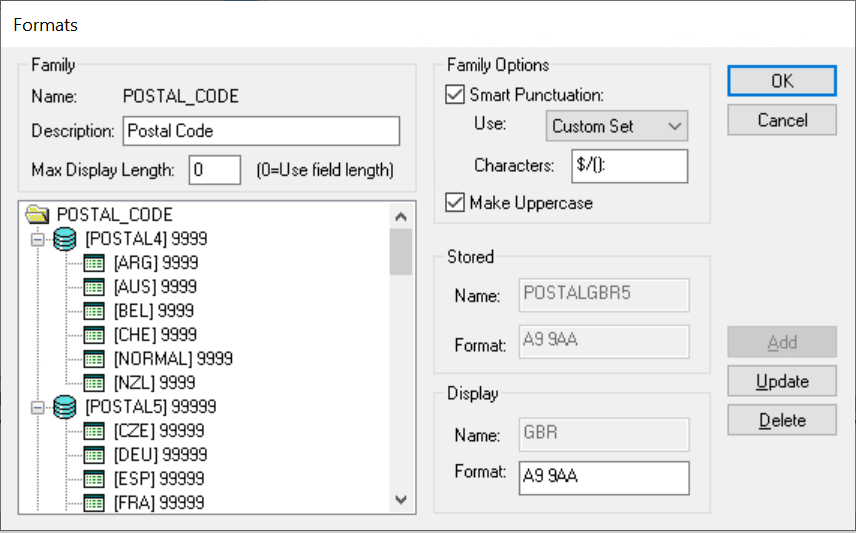
The Edit Formats dialog box presents a tree where you define the stored and display formats for a family and all options and attributes. This dialog box enables you to:
-
Add, update, and delete stored and display formats.
-
Enter a description for the family.
-
Specify options, such as uppercase and smart punctuation, for the family.
Click OK to save changes.
This example illustrates the fields and controls on the Formats dialog box. You can find definitions for the fields and controls later on this page.
This section discusses how to:
-
Add a new stored format.
-
Add a new display format to a stored format.
-
Update a display format.
-
Delete stored formats.
Adding a New Stored Format
To add a new stored format:
-
Open the format family to which you want to add a format.
-
Select the format family name.
-
Enter the stored and display names and format notation.
-
Click Add.
The new format appears in the tree below the existing formats.
Adding a New Display Format to a Stored Format
To add a new display format to a stored format:
-
In the tree, select the stored format name to which you want to add a display format.
-
In the Display group box, enter a new name and format notation.
-
Click the Add button to add the display format.
The new display format appears in the tree, attached to the stored format to which it belongs.
Updating a Display Format
To update a display format:
-
Select the display format in the tree view.
Note:
Clicking the Update button applies only to display formats.
-
Select a display format and enter the enabled fields.
-
Click Update to update the display.
Deleting Stored Formats
To delete a stored format:
-
Select the display format.
-
Click the Delete button.
PeopleSoft Application Designer displays a warning message indicating that deleting a display format might strand stored data. Select Yes to continue with the deletion.
Note:
Stored formats cannot be deleted directly. Therefore, all display formats for a specific stored format must be deleted first to ensure that data is not stranded in the database under an invalid format. When the last display format is deleted for a stored format, the stored format is automatically deleted.