Populating HTML Areas
This section discusses how to:
-
Populate an HTML area statically.
-
Populate an HTML area dynamically.
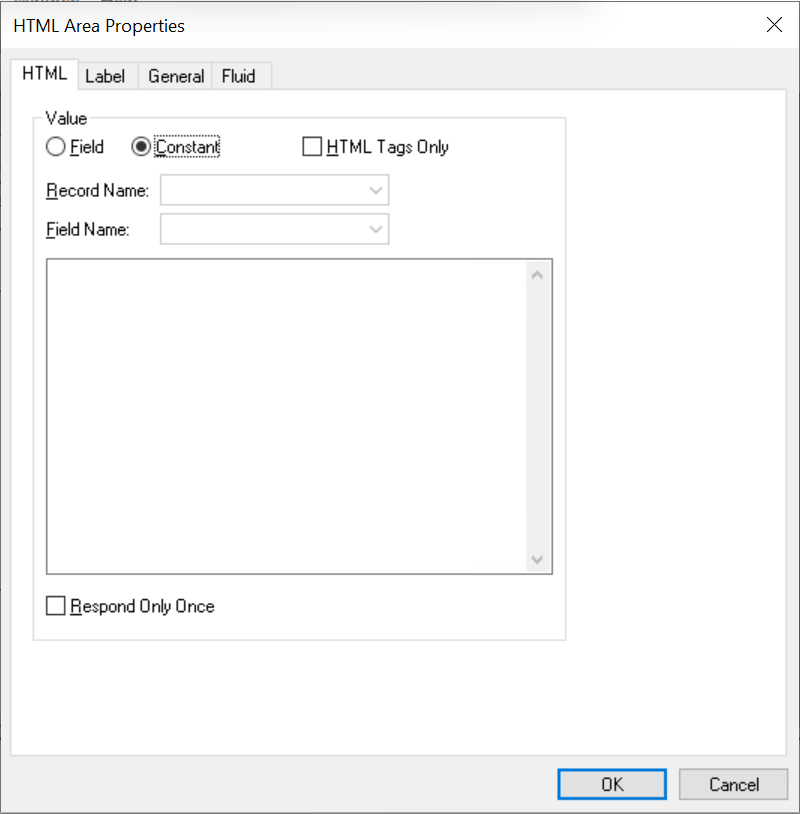
This example illustrates the HTML tab of the HTML Area Properties dialog box. The Constant radio button has been selected, which determines that static HTML code can be entered in the edit box.
| Field or Control | Description |
|---|---|
|
Field |
Select the Field radio button to enable selection of a record field for populating the HTML area dynamically at run time. |
|
Constant |
Select the Constant radio button to enable entering static HTML code in the text entry area below. |
|
HTML Tags Only |
Select this check box to disable processing of the HTML code that will relocate special tags such as <meta> and <script> from the body of the code into the <head> section of the HTML document. Therefore, this check box should be selected only when the HTML code includes tags that are for the <body> section of the HTML document. |
|
Record Name |
When the Field radio button is selected, select the record name. |
|
Field Name |
When the Field radio button is selected, select the field name that contains the HTML code at runtime. |
|
Respond Once Only |
Select this check box to indicate that this HTML area is to be included in the AJAX response one time only, except when some other properties of the HTML area have been changed, such as its content, label, and so on. When this check box is unselected, the HTML area is always included in the AJAX response. This setting applies to HTML areas at any level (from level 0 to level 3). Note: This setting can be overridden by the PeopleCode API Reference: ForceUpdateOnce property: Field class property of the Field class. |
Populating an HTML Area Statically
To populate an HTML area statically:
-
Access the HTML Area Properties dialog box.
-
On the HTML tab, select Constant as the value type.
-
In the text entry area, enter the HTML code that you want to appear in the HTML area.
Populating an HTML Area Dynamically
To populate an HTML area dynamically:
-
Access the HTML Area Properties dialog box.
-
On the HTML tab, select Field as the value type.
-
Specify the record and field to which you want to associate the HTML area control.
The value of the record field generates the HTML code that is included at runtime in the HTML area.
Note:
When you associate an HTML area control with a field, make sure that the field is long enough to contain the data that you want to pass to it. For example, if you associate an HTML area control with a field that is only 10 characters long, only the first 10 characters of your text will appear. You should use long character fields for record fields that are associated with an HTML area control.