Specifying Create Options
Access the Build Settings dialog box and select the Create tab.
This example illustrates the fields and controls on the Build Settings dialog box: Create tab. You can find definitions for the fields and controls later on this page.
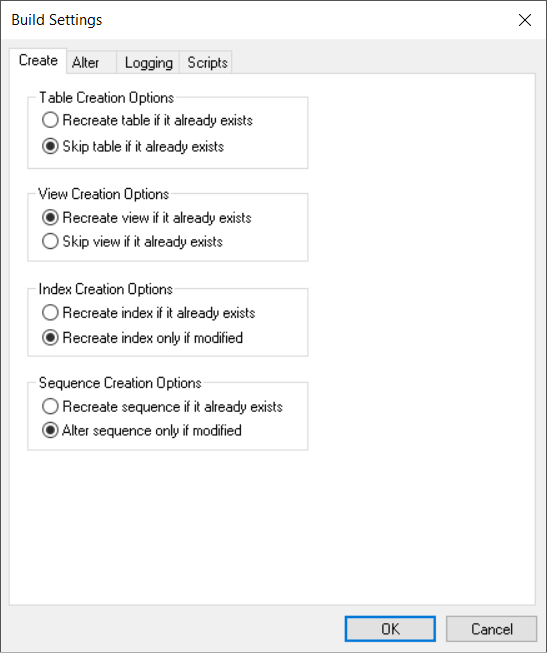
Table Creation Options
These options determine when a table should and should not be created.
| Field or Control | Description |
|---|---|
|
Recreate table if it already exists |
Select to drop and recreate a table if it already exists. Select this option with extreme care because if data already resides in the table, it is also dropped. If you select this option, the Build process prompts you to confirm your intention before performing any destructive action. If you do not care about losing the data that resides in the table, then this option is faster than the Alter Tables option. |
|
Skip table if it already exists |
Select to create only newly defined tables. If you want to preserve the data that already resides in existing tables or if you are only interested in creating the tables that do not already exist, select this option. |
View Creation Options
Similar settings are available for creating views that you use for creating tables.
| Field or Control | Description |
|---|---|
|
Recreate view if it already exists |
Because views are only logical views of data, you can safely select this option; you do not run the risk of losing physical data. Using this option ensures that all views in the project are rebuilt, whether they need to be or not. |
|
Skip view if it already exists |
If you are concerned only with creating views that do not already exist in the database, select this option. This option is useful if you want to run Build Project on a large project and only a subset of the views in the project must be created. This option consumes less time than recreating all of the views in the project. |
Index Creation Options
These options determine when an index should be recreated.
| Field or Control | Description |
|---|---|
|
Recreate index if it already exists |
Select to recreate the index for your tables, even if you already have one in place. This option recreates the index no matter what the situation. |
|
Recreate index only if modified |
Select to recreate the index only if the data in the indexes is being modified. |
Sequence Creation Options
These options determine when a sequence should be recreated or altered.
| Field or Control | Description |
|---|---|
|
Recreate sequence if it already exists |
Select to recreate the sequence even if a sequence already exists in the database. If a sequence does not exist in the database, this option creates a sequence. If a sequence already exists, then the sequence is dropped and a new sequence is created. |
|
Alter sequence only if modified |
Select to alter the sequence only if the sequence is being modified. |