Specifying Script Options
Access the Build Settings dialog box and select the Scripts tab.
When you run the create script in SQL Developer or SQL Plus, ensure that in client length settings you specify CHAR if the database is Unicode or BYTE if the database is non-Unicode.
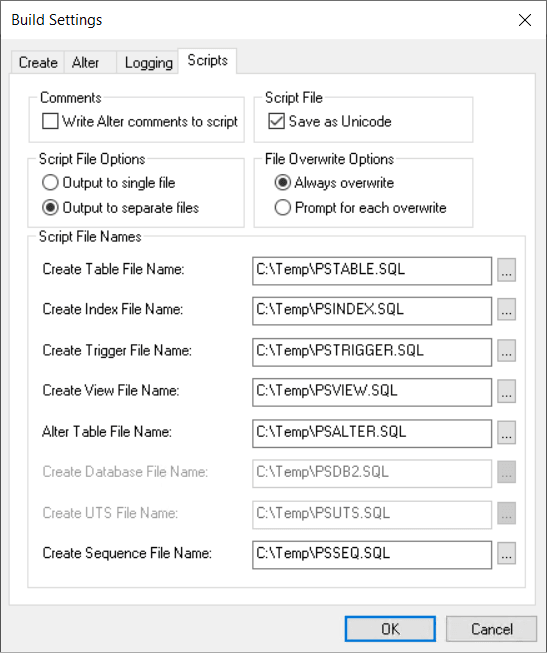
This example illustrates the fields and controls on the Build Settings dialog box: Scripts tab. You can find definitions for the fields and controls later on this page.
Comments
The Write Alter comments to script check box enables you to either include or suppress alter comments. The following example displays the types of comments that you see in your PSALTER.SQL script if you enable this option:
-- Alters for record PS_AE_RUN_CONTROL ;
--           AE_THREAD - change ;
--               OPRID - change ;

-- Start the Transaction ;
-- Data Conversion ;
-- Drop Old Indexes ;

DROP INDEX SYSADM.PS_AE_RUN_CONTROL
/

-- Add Columns ;

ALTER TABLE PS_AE_RUN_CONTROL ADD Z_TMP_ALTER_1 DECIMAL(12,4)
/
ALTER TABLE PS_AE_RUN_CONTROL ADD Z_TMP_ALTER_2 CHAR(12)
/
UPDATE PS_AE_RUN_CONTROL SET
    Z_TMP_ALTER_1 = AE_THREAD,
    Z_TMP_ALTER_2 = OPRID
/
If you do not view the alter comments, the script containing the same commands as the previous script looks like this:
DROP INDEX SYSADM.PS_AE_RUN_CONTROL
/
ALTER TABLE PS_AE_RUN_CONTROL ADD Z_TMP_ALTER_1 DECIMAL(12,4)
/
ALTER TABLE PS_AE_RUN_CONTROL ADD Z_TMP_ALTER_2 CHAR(12)
/
UPDATE PS_AE_RUN_CONTROL SET
    Z_TMP_ALTER_1 = AE_THREAD,
    Z_TMP_ALTER_2 = OPRID
/
Script File
The default for the Save as Unicode check box is based on the UNICODE/ANSI database. This check box is available when using Oracle, Microsoft SQL Server, and Db2 for z/OS databases.
The following table lists the default settings for the Save as Unicode check box:
| Database Type | Default for Save as Unicode Check Box |
|---|---|
|
Unicode |
Selected |
|
ANSI |
Unavailable |
The script file option, Save as Unicode, is stored in the registry with the other build settings. Therefore, the previous setting is always the default every time that the dialog box is opened.
The type of script file that is generated during the Build process is based on the Save as Unicode check box setting for the UNICODE/ANSI build and UNICODE/ANSI database. This table lists details:
| Database Platform | Unicode | ANSI |
|---|---|---|
|
SQL Server |
UCS2 |
ANSI |
|
Oracle |
UTF8 |
ANSI |
|
Db2 for z/OS |
UTF8 |
ANSI |
Script File Options
If you want all of your CREATE TABLE statements to be written to one SQL script file and your CREATE INDEX statements to another, then select the Output to separate files option. If you prefer to have all of your statements, CREATE, ALTER, and so on, contained in a single file, then select the Output to single file option.
Note:
Script files can be quite large. To reduce the size of files so that they are easier to manage, select the Output to separate files option. Also, the system never appends script files; it overwrites them or you can terminate the process if you elected to be prompted before a build script file is overwritten.
Depending on which output option you select, the options in the Script File Names group box change to suit one file or multiple files.
File Overwrite Options
These options indicate whether you want to overwrite automatically or be prompted before script files are overwritten. Your personal preference determines which technique you employ.
| Field or Control | Description |
|---|---|
|
Always overwrite |
Select to overwrite your previous build scripts. |
|
Prompt for each overwrite |
Select to be alerted when a script is about to be overwritten. To avoid the possibility of overwriting files altogether, you can use a naming convention that, in itself, prevents any overwrites. For example, you could specify a unique name for each build script, as shown:
|
Script File Names
The options available to select in this group box depend on your selection in the Script File Options group box.
| Field or Control | Description |
|---|---|
|
Output to single file |
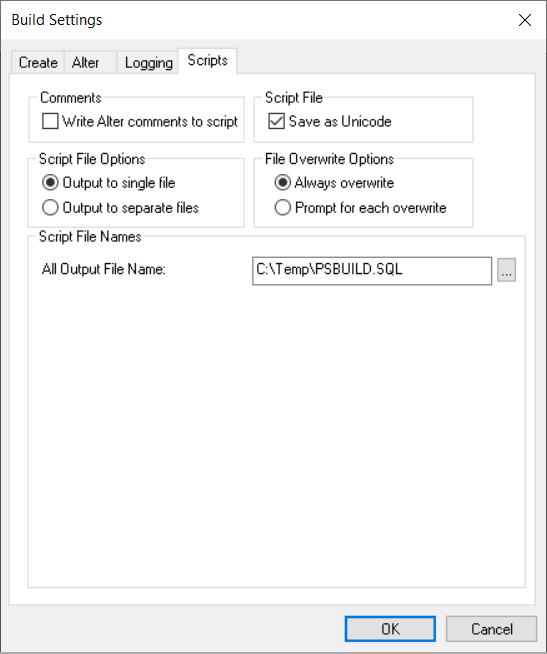
When you select this option, an edit box appears in the Script File Names group box: All Output File Name. The default name for the generated script is PSBUILD.SQL. Note: Script files can be quite large. To reduce the size of files so that they are easier to manage, select the Output to separate files option. Also, the system never appends script files; it overwrites them or you can terminate the process if you elected to be prompted before a build script file is overwritten. |
|
Output to separate files |
If you select this option, the following edit boxes appear, one for each build option:
The Create Database File Name and Create UTS File Name edit boxes are applicable for the Db2 for z/OS database. These edit boxes are enabled when the following conditions are met:
For more information, see the product documentation for PeopleSoft 9.2 Application Installation for Db2 z/OS. |
This example illustrates the fields and controls on the Output to separate files.