Style Classes
Access a style class dialog box.
This example illustrates the fields and controls on the PSEDITBOX style class properties dialog box. You can find definitions for the fields and controls later on this page.
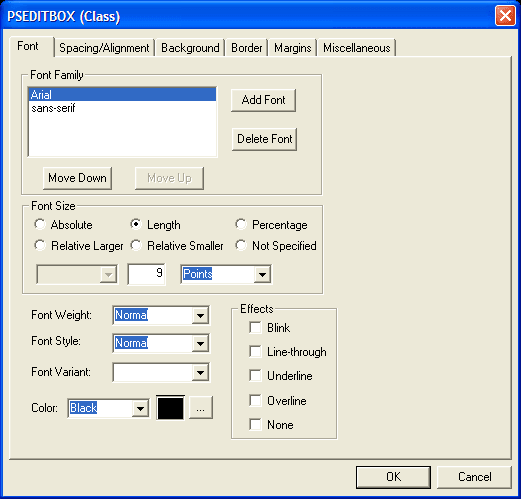
Standard style sheets and sub style sheets comprise standard style classes. The style class determines the visual properties of pages and page controls by controlling a broad range of characteristics, including font size, spacing, alignment, border width, font weight, and color.
Style classes in different style sheets are independent of each other. You can copy existing style classes and paste, or insert, them into any style sheet. However, the most efficient way to share style classes across multiple style sheets is to group style classes into sub style sheets.
Default Style Classes
Default style classes are the PeopleTools style classes that the system explicitly associates with a page element, such as the page, each page control type, page control labels, and so on. PeopleSoft applications use the default style classes to render the page and all page elements at design time and at runtime, unless you specify a style property override.
See Overriding Default Page Style Properties.
Note these points about default style classes:
-
If you change an attribute of a default style class, the change affects every occurrence of the page element throughout an application, except the instances that do not use the default style.
-
The application style sheet (or any page level override) must include all default style classes for the system to render pages correctly at design time and at runtime. The default style classes can be accounted for in standard or free form format in any combination. However, unexpected results will occur in both PeopleSoft Application Designer and PeopleSoft Internet Architecture pages if a default style class is missing.
Note:
PeopleTools style sheets include all default style classes. You should not modify any PeopleTools style sheets or the attributes of default style classes.
Most default style class
names enable you to easily identify the page element with which they
are associated. For example, PSEDITBOX is the
name of the default style class for all edit box page controls. When
you examine a specific edit box control, the value in the Style field,
however, is not the name of the default style class. The Style field
value of ***Use
Default Value*** identifies any page element using its
default style class.
This product documentation includes a topic that lists and describes the default style classes.
Custom Style Classes
This list includes some examples of custom style classes:
-
Creating new PeopleTools style classes, inserting them into standard style sheets, and using them as style overrides to create unique pages in an application.
-
Creating and inserting override style classes that supplant style classes inherited from a parent style sheet.
-
Overriding page style classes with non-default, existing PeopleTools style classes.
-
Creating free form style sheets that reconfigure one or more default style classes.