Style Sheet Types
You can create three style sheet types using PeopleSoft Application Designer:
-
Standard style sheet
-
Sub style sheet
-
Free form sub style sheet
Standard Style Sheet
This is an example of a standard style sheet:
This example illustrates the fields and controls on the Example of a standard style sheet. You can find definitions for the fields and controls later on this page.
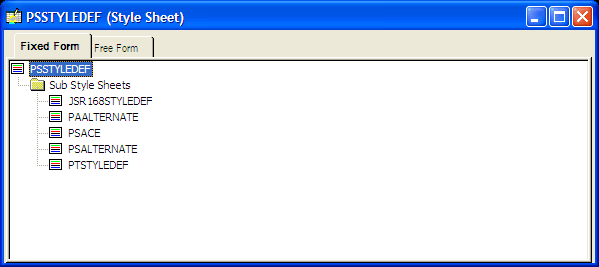
Standard style sheets are the primary organizers for working with style sheets and style classes. Standard style sheets are containers that can include sub style sheets, free form sub style sheets, and style classes in any combination; however, standard style sheets cannot contain other standard style sheets.
Standard style sheets can inherit style classes from other standard style sheet definitions through the Parent Style Sheet property. The parent style sheet propagates all of its style classes to the child style sheet. Only standard style sheets can have parent style sheets and be used as parent style sheets.
Sub Style Sheet
This is an example of a sub style sheet:
This example illustrates the fields and controls on the Example of a sub style sheet. You can find definitions for the fields and controls later on this page.
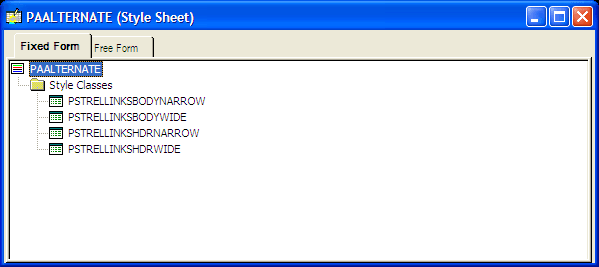
In the same way that PeopleTools supports subrecords, you can define sub style sheets. The primary purpose of sub style sheets is to organize and reuse style classes. You can insert sub style sheets into standard style sheets as well as into other sub style sheets. Sub style sheets neither have parent style sheets nor can be used as parent style sheets.
To use sub style sheets, you must insert them into standard style sheets.
Free Form Sub Style Sheet
This is an example of a free form sub style sheet:
This example illustrates the fields and controls on the Example of a free form sub style sheet. You can find definitions for the fields and controls later on this page.
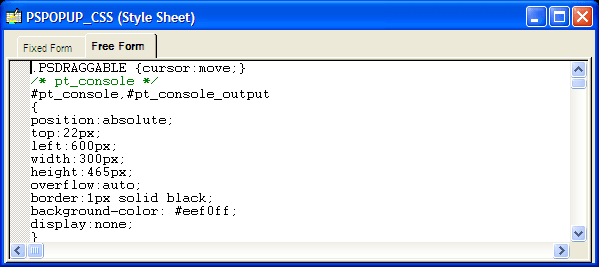
Free form sub style sheets are text-based sub style sheets that enable you to take advantage of Cascading Style Sheets - Level 2 (CSS2), AJAX, and DHTML features. With a free form sub style sheet, you can create the style sheet in a third-party editor and then copy the style sheet text into the Free Form tab of the free form sub style sheet. On free form sub style sheets, the Fixed Form tab is grayed out because free form sub style sheets do not support inheritance or aggregation. Free form sub style sheets cannot have parent style sheets nor can they be used as parent style sheets.
Note these important points regarding the use of free form sub style sheets:
-
Like other sub style sheets, to use free form sub style sheets you must insert them into a standard style sheet or into a sub style sheet that is part of a standard style sheet.
-
When creating free form style sheets, style class names must be identical to the PeopleTools default style class names.
If you replace the default style sheet or override the page style sheet with a style sheet that includes only free form text, the free form sub style sheet must define and include all default style classes used by the application. Unexpected results will occur in both PeopleSoft Application Designer and PeopleSoft Internet Architecture pages if a default style class is missing.
-
At runtime, style classes in free form sub style sheets take precedence over PeopleTools-formatted style classes of the same name.
Note:
Free form sub style sheets are supported in PeopleTools release 8.50 and later. If you attempt to import a free form sub style sheet into an earlier release, the free form sub style sheet imports as an empty standard style sheet.