Understanding Table Sharing
To share tables, you must modify the record definitions for both the table that you want to share and the one that contains the set control field. Using the online PeopleTools utilities for tablesets, you define the terms or controls for sharing.
For example, the PeopleTools database holds data for three companies: one U.S.-based parent company (PST) and two sister companies (CCB in the U.S. and VNB in Canada). In this organization, all of the U.S.-based companies share one set of accounting codes, and all of the Canadian-based VNB companies share another:
| U.S. Account Codes | Canadian Account Codes | Description |
|---|---|---|
|
123456789 |
123456789 |
Teller |
|
987654321 |
987600000 |
Customer Service |
|
CCB-4476-EXTSAL-USA |
VNB-4476-EXTSAL-CDN |
Extraordinary Salary Employees |
|
CCB-4476-REGSAL-USA |
VNB-4476-REGSAL-CDN |
Regular Salary Employees |
These two groups of companies must maintain parallel sets of accounting codes and, in some cases, use the same code, uniquely identified for U.S. or Canadian companies.
You must set up the Account Code table so that users who access that page or prompt for valid values see only the values for their respective companies, depending on whether they are located in the U.S. or Canada.
To do this:
-
Modify the Account Code table, which will be shared, and the Company table, the values of which (CCB, PST, VNB) control the tablesets that are used.
-
Create two tableset IDs:
-
USA: For U.S. companies.
-
CAN: For Canadian companies.
-
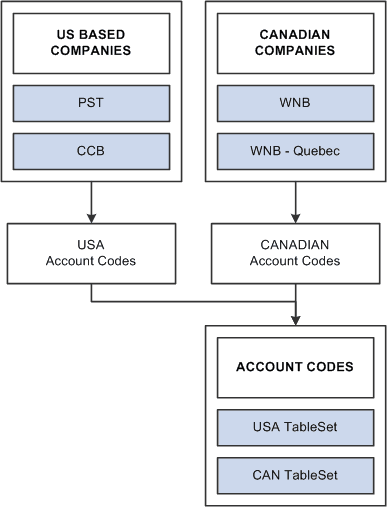
The following diagram explains how two groups of companies can maintain parallel sets of accounting codes that contain unique tablesets and set control fields
Assigning Set Control Fields
If you plan to use the Table Sharing feature to add an additional high-level key to identify common sets of values and handle exception values, you enter a set control field. The set control field determines which set of values appears, based on how you define table sharing.
Table sharing is usually applied in multi-company environments, in which you might want to share certain tables in some operating entities while allowing others to retain control over the contents of their own. Use the feature to maintain a single table in which you can store multiple sets of values to be used by different entities in your organization.
When you create a record definition that will be shared, you add the field SETID as a high-level key. The setID value is controlled by the key that you select in the Set Control Field drop-down list box in the Record Properties dialog box. These setIDs identify groups of tables to be shared and enable each business entity to identify whether it wants to use the corporate-wide table or maintain its own. Enter the name of the key as your set control field for each record definition that will be shared.
For example, if you have several companies in your organization, many of which share the same set of account codes, add a SETID field to the ACCOUNT table record definition. In this definition, enter Company as the set control field. The set control enables different companies to access the account values stored in the same Account table. As each company defines its set controls, it has the option to use the shared Account table or maintain control of its own.