Using the Page Control Inspector
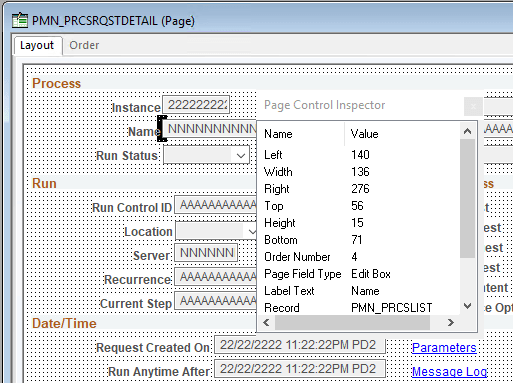
The Page Control Inspector provides location, size, type, and data source information for the selected page control on the page. The first six values, Left, Width, Right, Top, Height, and Bottom, display the exact bounding coordinates in pixels of the control on your page in PeopleSoft Application Designer. The remaining values help distinguish the selected control from others on the page.
Access the Page Control Inspector from the View menu or by clicking the Toggle Inspector button on the page definition toolbar. When you finish viewing the values for one control, click another control to view its values. You can check multiple controls on a page in quick succession.
This example illustrates the fields and controls on the Page Control Inspector.
Note:
The HTML that is generated for your page uses table layout, rather than pixel layout. You should preview how your page might look in the PeopleSoft Pure Internet Architecture as you design it. Spacing of fields at runtime may not appear exactly the same as during design time.
While the Page Control Inspector displays values for a grid, no information is available for individual grid columns.