Using the Record DDL
Use the record DDL to define parameters and default values for the tables in your database. PeopleSoft applications provide templates for each database platform that PeopleTools supports. The templates contain the typical parameters for each database platform. The mechanics of editing and viewing record, index, and unique index DDL are the same as for space DDL.
Access the Maintain Record DDL dialog box from The Data Administration menu option is only enabled if a record definition is open.
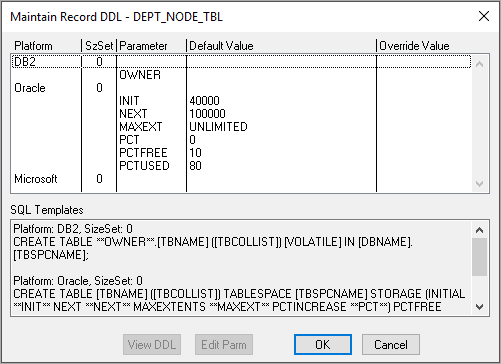
This example illustrates the fields and controls on the Maintain Record DDL dialog box. You can find definitions for the fields and controls later on this page.
| Field or Control | Description |
|---|---|
|
View DDL |
Select a Platform row in the Maintain Record DDL dialog box to enable the View DDL button. This button opens the DDL Statements dialog box, which displays the CREATE TABLE DDL for the current record on each of the database platforms. |
|
Edit Parm (edit parameter) |
Select a Parameter row in the Maintain Record DDL dialog box to enable the Edit Parm button. This button opens the Edit Override Parm Value dialog box, where you can enter a new value to override the Default Value listed in the table. The new value is stored in the PSRECDDLPARM override table. |