Setting the Tablespace
The Change Space dialog box is an editing tool with which you can select the space name and view the records attributed to the named space in the database.
Access this dialog box by selecting This dialog box also appears automatically when you attempt to save a new record definition. For each new record definition that is created in PeopleSoft Application Designer, you must allocate a tablespace name. For the Change Space dialog box to appear upon saving a new record definition, you must select the Platform Compatibility Mode check box under .
This example illustrates the fields and controls on the Change Space dialog box. You can find definitions for the fields and controls later on this page.
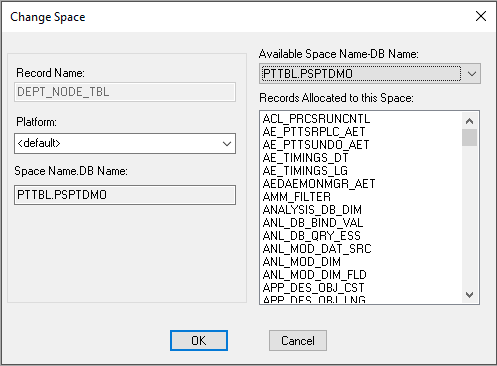
| Field or Control | Description |
|---|---|
|
Record Name |
Displays the name of the current record definition. This field is display-only. |
|
Platform |
Select from the available database platforms to which you can assign the designated space name. |
|
Space Name.DB Name (tablespace name.database name) |
Displays the available space name that is assigned to the current record. This field is display-only. |
|
Available Space Name-DB Name (available tablespace name-database name) |
Select the space name and database name to assign to the record. |
|
Records Allocated to this Space |
Displays all of the records that are already allocated to the space that you selected from the Available Space Name-DB Name drop-down list box. This field is display-only. |