Filter
You can use the Log Analyzer feature to access filtered information about the AE process.
This example illustrates the fields and controls on the Filter Option in Log Analyzer:
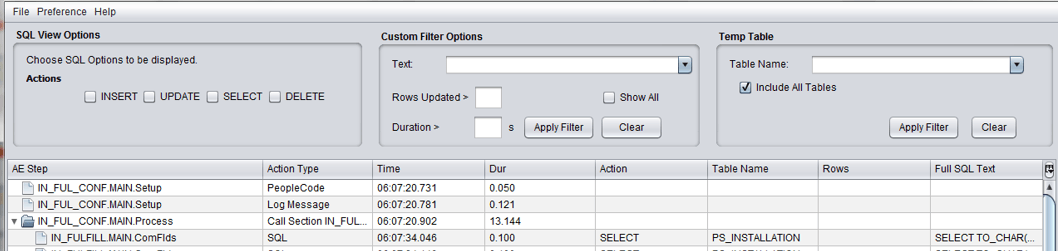
The AE process information can be filtered by:
-
SQL statement action
-
Text
-
Duration
-
Rows updated
-
Temporary Table Data
| Filter by | Action |
|---|---|
|
SQL Statement action |
Displays filtered information about the AE process based on the following SQL statement actions:
|
|
Text |
Displays filtered information about the AE process based on text. |
|
Duration |
Displays filtered information about the AE process based on duration of the steps. |
|
Rows updated |
Displays filtered information about the AE process based on the number of rows that were updated in the AE process. |
|
Temporary table data |
Displays filtered information about the AE process with temporary table data. |
Related Topics