Understanding Fluid Sectionalized Homepages and Dashboards
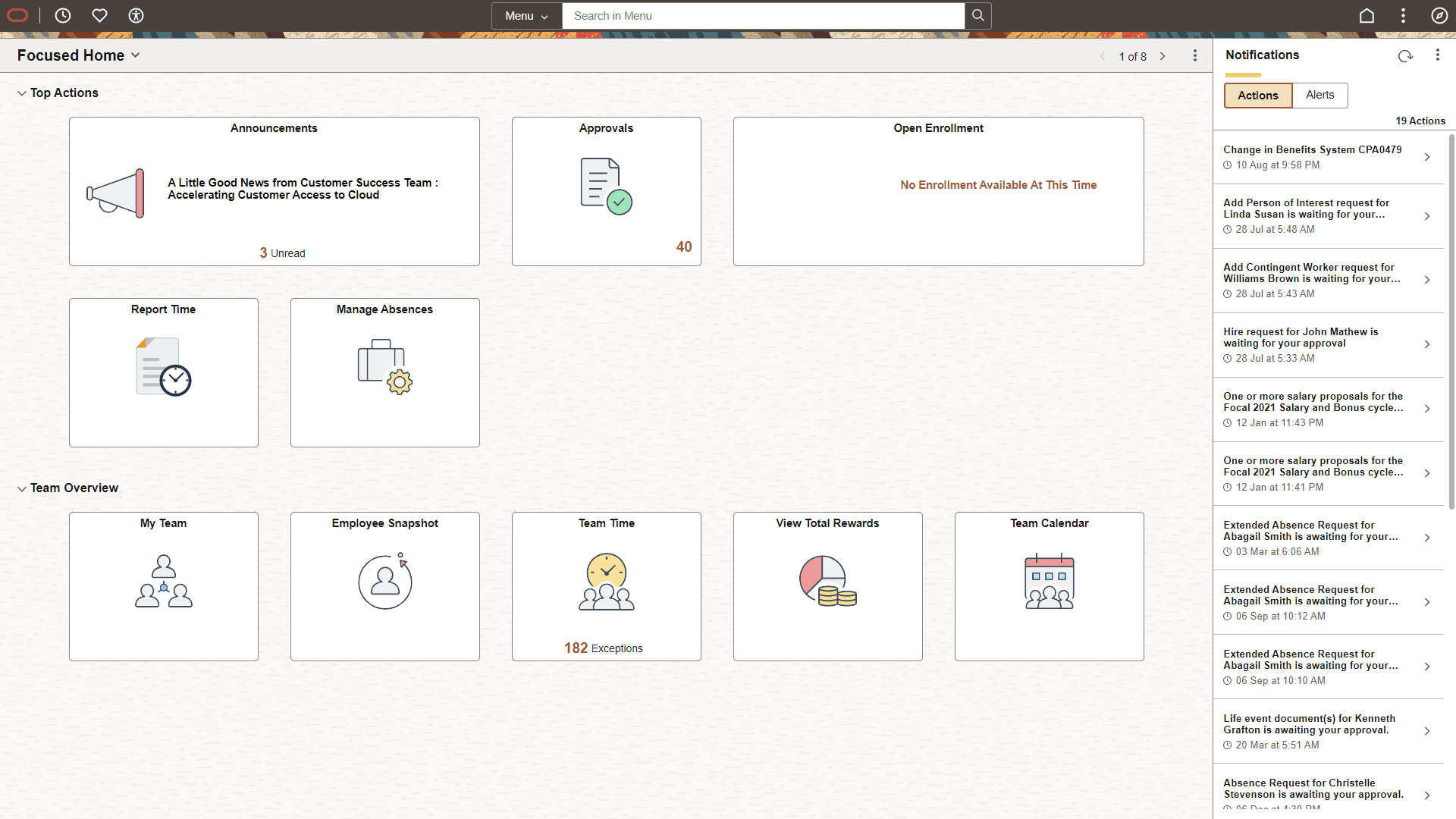
Portal administrators and Dashboard administrators can sectionalize a fluid homepage and dashboard, respectively. A section is a collection of tiles under a categorization label that generalizes the purpose of the tiles in that section. It improves the usability and user experience of a homepage or dashboard. Sections provide administrators greater control over the sequence of tiles on a homepage or dashboard. A homepage can have multiple sections.
Note:
Sectionalized homepages and dashboards do not allow end-user personalization. See Managing Fluid Homepages.
Sectionalized homepages and dashboards provide:
-
Quick navigational access to a group of tiles that serve a general purpose.
-
The ability to collapse and expand the sections.
When working with sectionalized homepages and dashboards, consider:
-
A section can contain several tiles.
-
If a section does not contain any tiles, the section is not displayed on the homepage.
-
User personalization is not available on sectionalized homepages and dashboards and considered locked. Therefore, the options to delete or add tiles are not available in these sections. However, you can copy a tile from a locked homepage. See Managing Fluid Homepages.
This example illustrates the appearance of a fluid sectionalized homepage.