Using Calendar Prompts
When entering information in a date field, you can select the calendar prompt button to the right of the field to help you choose a date. You can also enter the current day's date by entering today in the date field. Press Tab to exit the field; the current date appears. This feature can also use languages specific to a locale.
This example shows the calendar window that appears when you click the calendar prompt button.
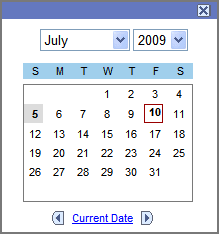
To change the calendar month, select the drop-down list box arrow for the month. To change the year, select the drop-down list box arrow for the year. Click the correct day of the month to select the day. Press Esc to cancel and close the calendar.