Configuring Properties for Insights Dashboard
The Deploy Insights Dashboard plug-in on Configuration Template Definition page enables you to deploy the insights dashboards automatically as per the defined configuration properties.
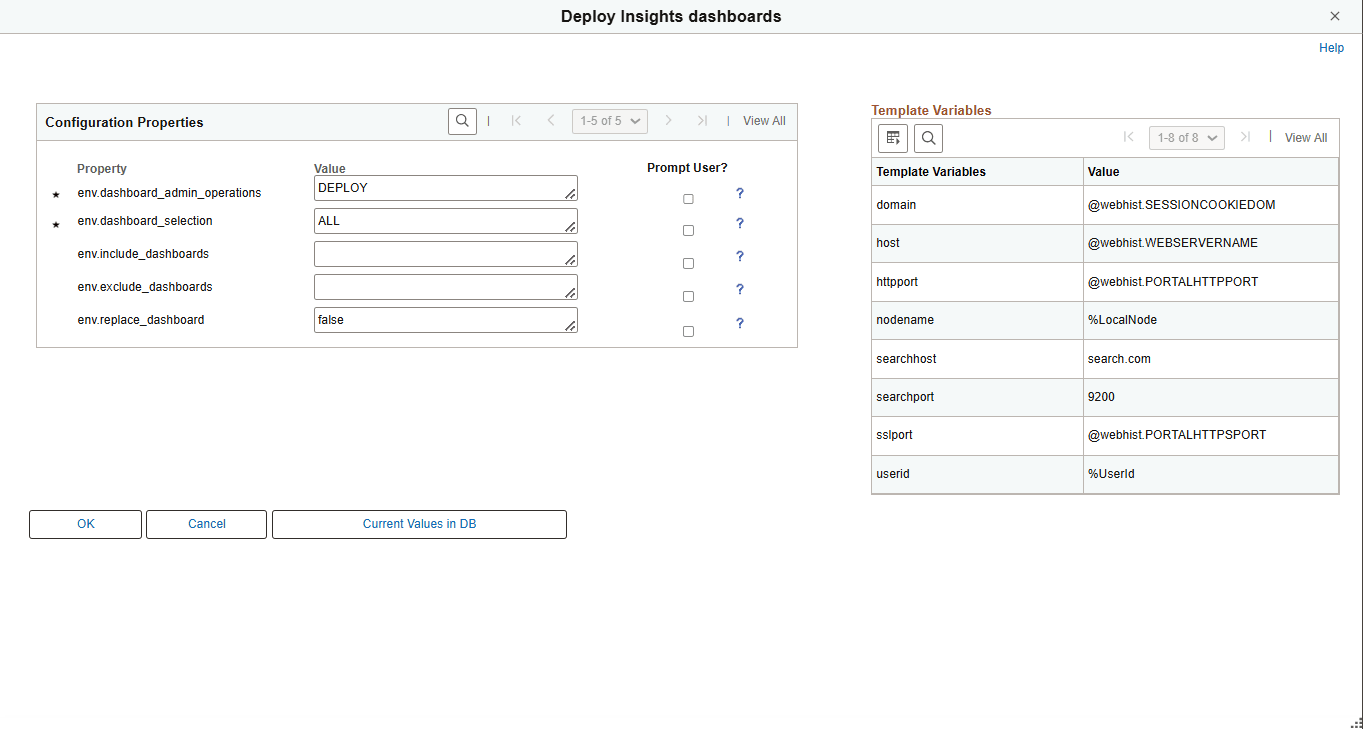
This example illustrates the fields and controls on the Configuration Properties page for Deploy Insights dashboards. Definitions for the fields and controls appear following the example.
| Field or Control | Description |
|---|---|
|
env.dashboard_admin_operations |
Select one of these valid values:
This is a mandatory property. |
|
env.dashboard_selection |
Select one of these valid values:
This is a mandatory property. |
|
env.include_dashboards |
Enter a comma-separated list of dashboard names to be deployed if you selected List in env.dashboard_selection field. |
|
env.exclude_dashboards |
Enter a comma-separated list of dashboard names to be excluded from deployment if you selected All in env.dashboard_selection field. |
|
env.replace_dashboards |
The default value is false, which ensures that the existing dashboards are not redeployed. If set to true, it redeploys and overwrites the existing dashboard. |