Handling Errors During Plug-in Execution
While the final result of a configuration template run is displayed on the Configuration Template Definition page in PIA and in the console in the command line, PeopleTools provides you options for handling errors that may occur within the execution of a configuration template. Using these error handling options provide more control over the configuration as well as providing insight into trouble areas immediately, rather than after combing through log files. The result of the template execution is determined based on the status of each plug-in, and the overall result is displayed in a specific format.
You set the preconditions and post-conditions on the Configuration Template Definition page by clicking the icon in the Pre/Post Condition column. See Executing Configuration Plug-ins.
This example illustrates the options available for setting preconditions and post-conditions.
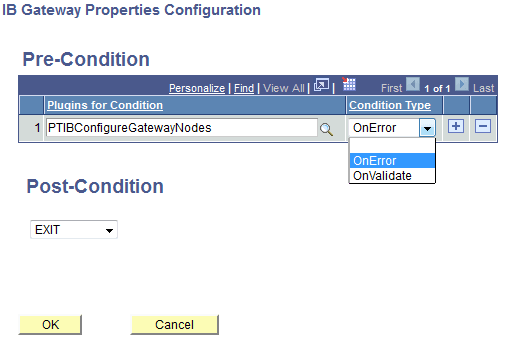
Setting Preconditions
For preconditions, you can specify a list of plug-ins that should be executed successfully as a precondition. For example, for Search Framework functionality to work, it is mandatory that the dependent Integration Broker configuration should be successfully configured and operational, in which case, the precondition list could contain a set off the Integration Broker plug-ins. If any of the plug-ins in the list fail, the system skips the selected Search Framework plug-in and executes the next plug-in for that template.
You can set these types of preconditions.
-
On Error.
With On Error, specify the conditional execution of plug-ins with respect to the execution off other plug-ins within the same template file. For example, if there is a precondition On Error for Search Framework plug-ins within a template and the Integration Broker related plug-ins are identified in the list, and the Integration Broker plug-ins are in the same template, the Search Framework plug-in execution would be skipped if the Integration Broker plug-in execution fails.
-
On Validate.
The precondition On Validate allows you to specify the conditional execution of plug-ins with respect to other plug-ins that are not part of the same template file. For example, if On Validate for Search Framework plug-ins identifies a list of Integration Broker-related plug-ins, the Search Framework plug-in execution would be skipped if the specified Integration Broker plug-in functionality fails. For instance, if the validation procedure of pinging a node or pinging the gateway fails, the Search Framework plug-ins would be skipped.
You selections on this page will appear in the template file similar to the following example.
plugin.ptsf.1=PTEM_CONFIG:PTSFAdministerSearch

PreConditionOnError= PTIBConfigureDBNode, PTIBConfigureGatewayNodes
PreConditionOnValidate= PTIBConfigureDBNode, PTIBConfigureGatewayNodes

...
Note:
If the precondition section is absent for a plug-in, the system assumes there are no dependencies and the configuration execution takes place as if the plug–in is independent.
Setting Post-Conditions
If a configuration template execution should or should not continue based on the status of the current plug-in, you can set a post condition. For example, if you are configuring Integration Broker and you determine that the gateway node configuration is mandatory for proceeding with any further configurations, then select Exit from the Post-Condition drop-down list. This means that in the event of failure of the IBGatewayNode plugin execution, the system halts the execution of the current configuration template. By leaving the Post-Condition drop-down list empty, you indicate for the template execution to continue.
The following example illustrates how the post-condition would appear in the template file:
plugin.ib.2=PTEM_CONFIG:PTIBConfigureGatewayNodes
PostCondition=EXIT
Assign EXIT to PostCondition in the template file to indicate that the template execution should halt if the current plug-in fails. Assign CONTINUE to PostCondition for the plug-in to carry on processing despite failure of the current plug-in, or you may remove or comment the line to achieve the same effect. The default behavior is similar to the case when the keyword CONTINUE is assigned to PostCondition.