Analyzing Applied PRP(s)
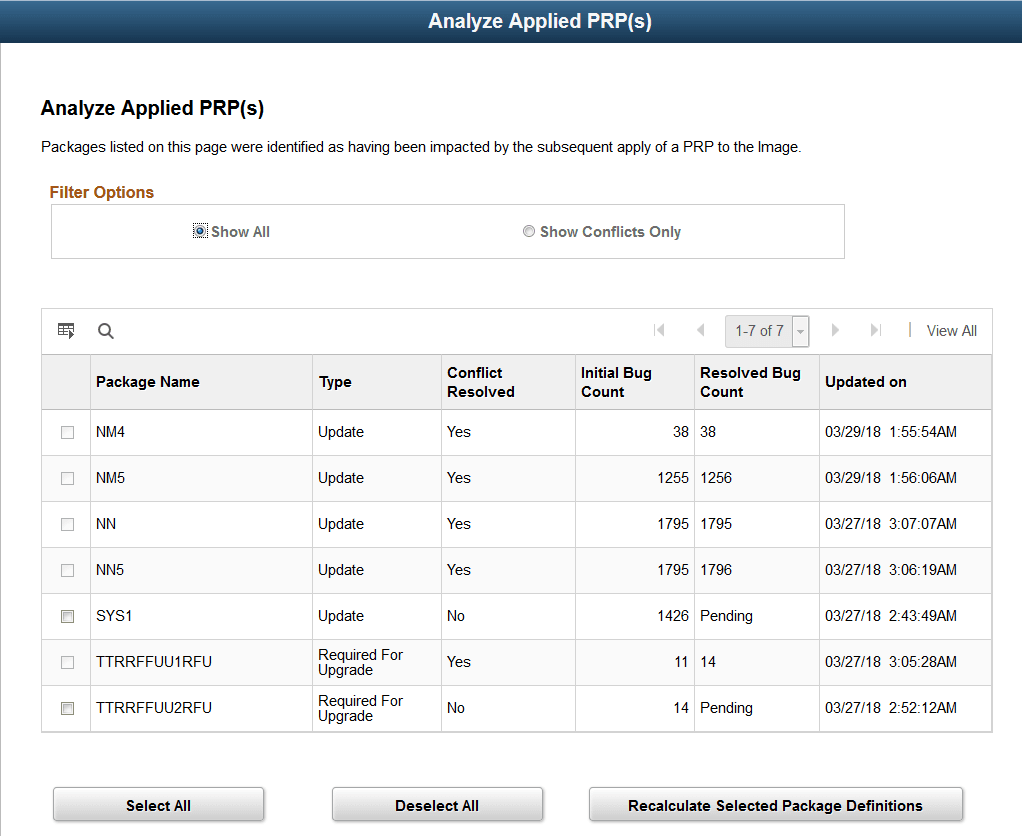
If you have existing defined or created Change Package definitions that have not been applied to your target database, conflicts may exist after applying PRPs to the PUM source that will impact the existing Change Package. The PRP may contain post requisite updates, which would result in a partial and undocumented apply. To prevent this scenario, conflicts will be detected when the PRP is applied to the PUM source and displayed on the Analyze Applied PRP(s) page. The Recalculate Selected Package Definitions button on the Analyze Applied PRP(s) page will run the application engine program PTIARECALCCP to recalculate the package and remove the conflicting bugs.
Navigation:
Select
This example illustrates the fields and controls on the Analyze Applied PRP(s) page. You can find definitions for the fields and controls later on this page.
| Field or Control | Description |
|---|---|
|
Filter Options |
Set the filter to show all or conflicts only. |
|
Package Name |
Name of the unapplied Change Package definition. |
|
Type |
Change Package type:
Note: PRPs do not deliver changes to translations, therefore Translation packages (TDP) are not affected. |
|
Conflict Resolved |
Indicates whether or not the conflict has been resolved. |
|
Initial Bug Count |
Indicates the initial number of bugs in the change package. |
|
Resolved Bug Count |
Indicates the number of bugs after the conflict has been resolved. If Conflict Resolved is No, the resolved bug count will be Pending. |
|
Updated On |
Date the change package was last updated. |
|
Select All |
Click to select all packages. |
|
Deselect All |
Click to deselect all packages. |
|
Recalculate Selected Package Definitions |
Click to recalculate the selected packages. This will launch the PTIARECALCCP application program in Process Scheduler. Depending on the size of the Change Package, the job may take a while to complete. This program will set the Conflict Resolved Status to Y (Yes) if successful or E (Error) if a failure occurs. |