Applying the PeopleTools Patch Change Package
To apply the PeopleTools patch in Change Assistant:
-
In Change Assistant, select Tools, Change Actions.
-
Select Update Manager and click Next.
-
Select Apply a Patch to your Current PeopleTools Release and click Finish.
-
Review the Change Package Settings page and click Next.
PeopleTools patches do not use the PUM Source, so it will indicate Not Set.
The download directory is always the PTP directory in your target home.
PeopleTools patches are always applied to the target database.
-
Select the target database, if the database has not been defined yet use the Create button to create the database.
-
Click Next.
-
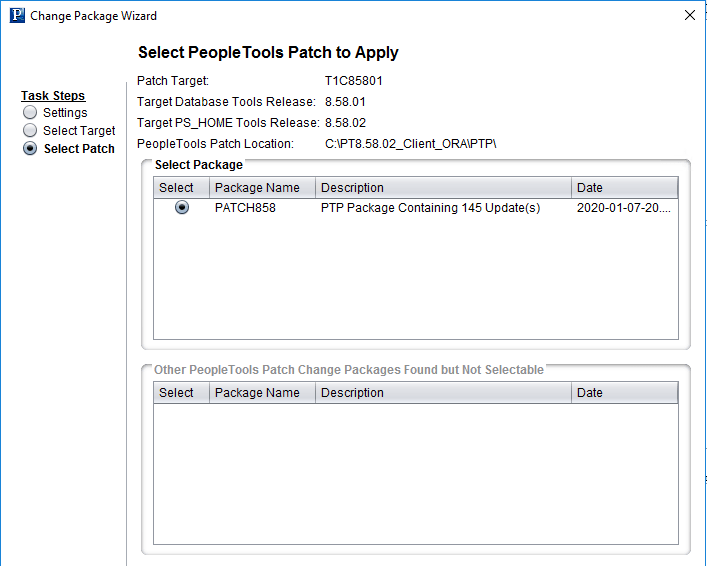
Select the Change Package.
This example illustrates the fields and controls on the Select PeopleTools Patch to Apply.
-
Click Next.
-
Change Assistant performs a PeopleTools patch version check. Review the messages and click Next.
A warning is displayed if the selected patch is at the same or a lower level than the installed PeopleTools patch. It is not recommended to re-apply or downgrade PeopleTools patches.
-
The Apply Summary page is displayed, review the summary and click Finish.
-
Change Assistant will load the change package and run the PeopleTools patch job.
-
All steps will run unattended and when the last step is complete you will receive a message that there are no more steps to run.
PeopleTools Patch Level
In PeopleTools 8.54, a new field PTPATCHREL was added to the PSSTATUS table. When you apply a PeopleTools patch, the PTPATCHREL field is updated with the new PeopleTools patch level.
Using Command line to Apply PeopleTools Patch
Alternatively, If you have configured a target database and general options in Change Assistant, you can apply the PTP via the command line by using an updated version of the following syntax: For example:
Changeassistant.bat -MODE UM -ACTION PTPAPPLY -TGTENV <YOUR_TARGET_DB_ENV_NAME_LIKE_PT856TST> -UPD PATCH856 See the section Command Line for Applying PeopleTools Patch in Update Manager Mode