Define Update Package Wizard Step 5 of 6
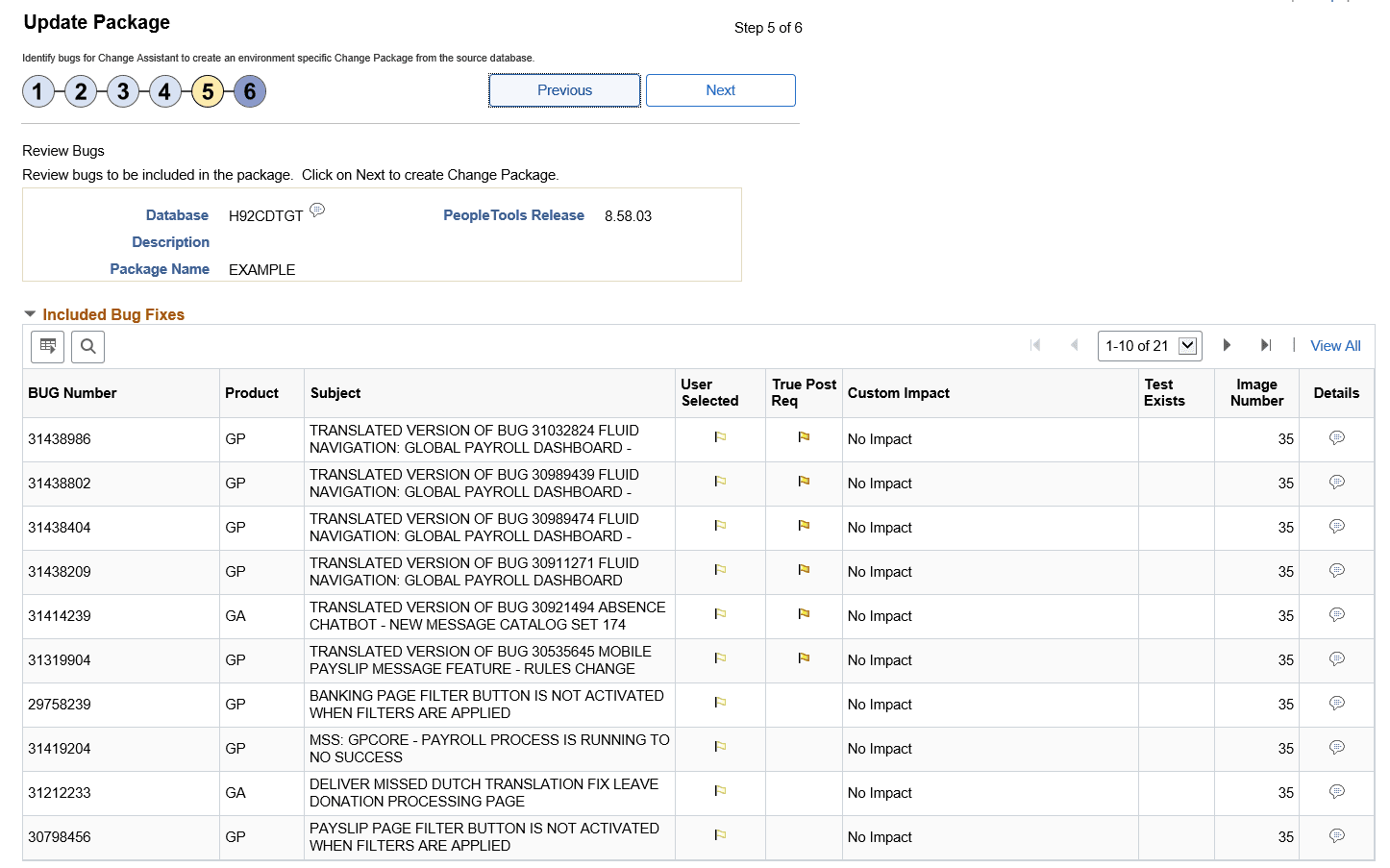
The fifth step is to review the results of the dependency calculation. This page will display all of the updates selected, as well as all dependent updates. Any updates that include PeopleTools hard dependencies will be excluded from the change package and listed in the Excluded Tools Dependent Bug grid.
Note:
This page is read-only. In order to modify the results, the user must click Previous to return to the previous page in the Wizard.
This example illustrates the fields and controls on the Update Package Step 5 of 6 page. You can find definitions for the fields and controls later on this page.
| Field or Control | Description |
|---|---|
|
Bug Number |
All of the bug numbers that will be included in the change package are listed. |
|
Product |
The PeopleSoft product impacted. |
|
Subject |
Displays the subject for the bug. |
|
User Selected |
If the bug number was selected in Step 4, this column will contain a check. Updates that do not have a check are required for the selected updates. |
|
Applied |
If the bug has already been applied to your database, this column be checked. Note: Applied bugs are not included in the change package definition. |
|
True Post Req |
Icon is displayed to indicate the bug type. |
|
Subject |
Bug subject is displayed |
|
Image Number |
Image where the bug was fixed. |
|
Custom Impact |
Indicates whether or not the bug has an impact on an object stored in the Customization Repository. |
|
Test Exists |
A visual indicator will be displayed if the bug has an impact on a referenced component stored in the Test Repository. |
|
|
Click the Bug Details icon to display the Bug information. |
|
Excluded Bug Fixes Section |
Expand this section to view bugs that are excluded from the package, excluded bug will include bugs that have already been applied, bugs the user excluded, bugs that fail to meet the minimum tools level, and bugs that are required for upgrade. |
|
Overlapping Packages Section |
This section will appear if any of the bugs selected have already been included in another change package definition that has not been applied to the database. Note: If overlapping packages are listed, you will be prompted to either click OK to ignore the overlapping packages, or click Cancel to return to the previous page and review the change package. |

Bug Details
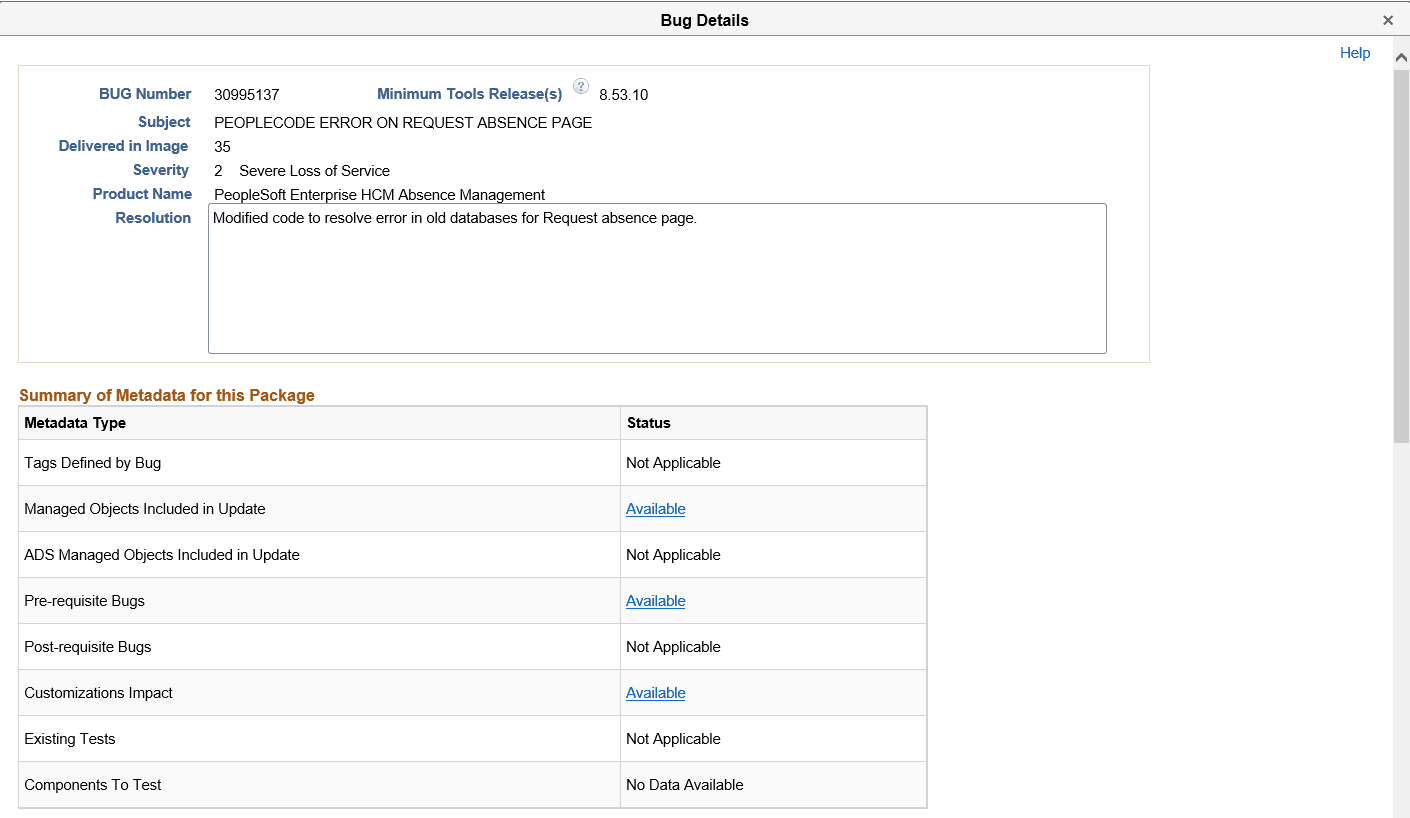
When you click the bug details icon, a modal window is displayed:
This example illustrates the fields and controls on the Example Bug Details (top of page). You can find definitions for the fields and controls later on this page.
| Field or Control | Description |
|---|---|
|
Summary of Metadata for this Package |
For each metadata type, if there is metadata, a link Available is displayed. Use this link to go to that section of the bug detail. If the metadata type is not contained in the package, the metadata type will indicate Not Applicable. Bugs delivered through a PRP will have no data on components to test , therefore Components to Test will indicate No Data. |
|
Pre-requisite Bugs |
List of pre-requisite bugs, their subjects and image numbers. Click the Details icon to open a window with the bug details. |
|
Tags Defined by Bug |
The tag name and value represent the tracking group and value. A bug can have 0-n Tracking Groups defined. |
|
Managed Objects Included in Update |
List of managed objects included in the change package. The object columns list the records, fields and so on, that are part of the fixes in the bug. |
|
ADS Managed Objects Included in Update |
List of ADS managed objects included in the change package. The columns list the Data Set name, customization count, data set record, and object values that are part of the fixes in the bug. |
|
Post-requisite Bugs |
List of post-requisite bugs, their subjects and image numbers. Click the Details icon to open a window with the bug details. |
|
Customizations |
Lists the names of the customizations that affect this bug. |
|
Tests |
Lists the test names that provide coverage for this bug. |
|
Components to Test |
Lists the components to test for this bug. |