Using the Selection Grid
Regardless of the search option selected, the search results will always be displayed in the selection grid at the bottom of the search page.
This example illustrates the fields and controls on the List of Updates grid. You can find definitions for the fields and controls later on this page.
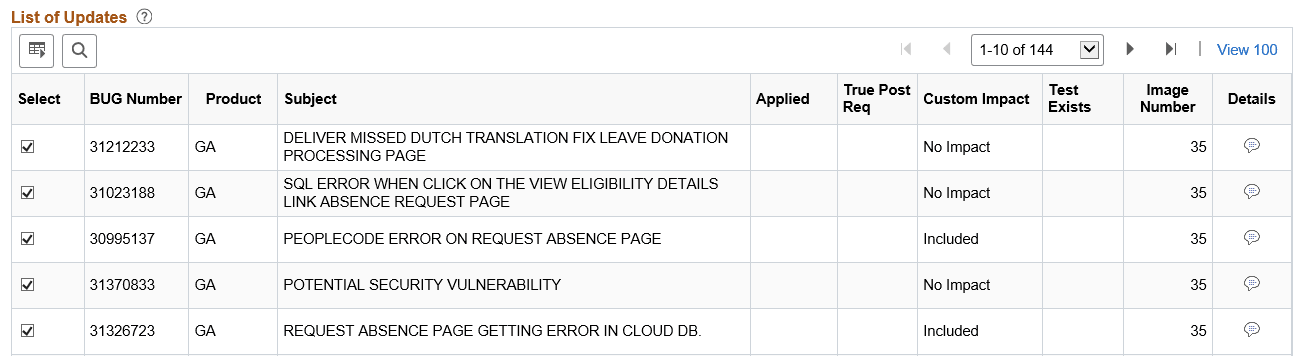
| Field or Control | Description |
|---|---|
|
Show Already Applied Updates |
Select this check box to include already applied updates in the result set. If this check box is selected, a visual indicator will appear in the Applied column. |
|
Bug Number |
Lists the bug numbers returned by the search. |
|
Subject |
Displays the subject for the bug. |
|
Applied |
A visual indicator will be displayed, if the Show Already Applied check box is selected and the bug has already be applied to the target database. This bug is not included in the change package definition. |
|
True Post Req |
True post-requisite updates will be sorted to the top of the bug list. A visual indicator is displayed to identify the bug as true post requisite. All bugs discovered based on the Post Requisites for (Select) Previously Applied bugs will be listed as suggested. |
|
Custom Impact |
Indicates whether or not the bug has an impact on an object stored in the Customization Repository. |
|
Test Exists |
A visual indicator will be displayed if there is a test name in the Test Repository corresponding to an object in the bug. |
|
Details |
Click this icon to display the bug details. |