Exporting Change Assistant Setting in Change Assistant
Use the Export/Import Change Assistant Setting option to export or import settings.
Navigation:
In Change Assistant, select Tools, Export/Import Change Assistant Settings
or
In Change Assistant, select Tools, Change Actions, Update Manager, Export/Import Change Assistant Settings
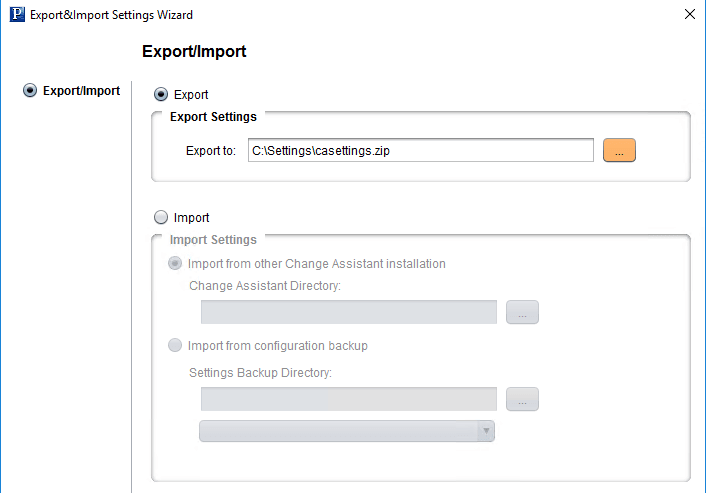
This example illustrates the fields and controls on the Export&Import Settings Wizard – Export/Import page to export settings.
Exporting Change Assistant Settings
To export Change Assistant Settings:
-
In Change Assistant, select Tools, Export/Import Change Assistant Settings.
-
Select the Export radio button.
-
Enter the destination directory and file name.
-
Click Next.
-
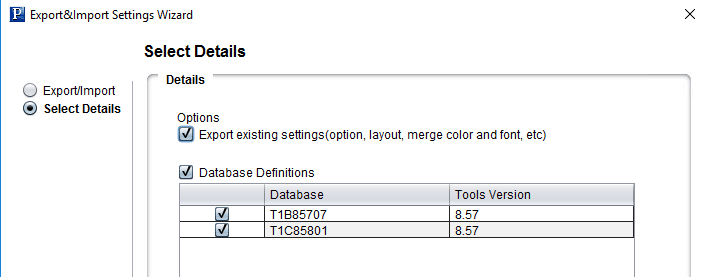
On the Select Details page, select if you want to export the settings, as well as the databases.
This example illustrates the fields and controls on the Export&Import Settings Wizard – Select Details page. You can find definitions for the fields and controls later on this page.
Field or Control Description Export existing settings(option, layout, merge color and font, etc)
Select this option to export CA settings.
Database Definitions
Select this option to export database definitions. When this option is selected, the databases defined in CA will be listed and you can choose which databases to export.
-
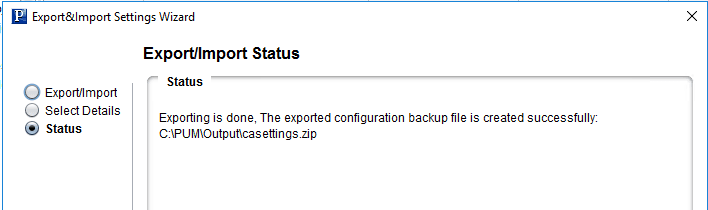
Click Next. The status is displayed with the path to the configuration backup file.
This example illustrates the fields and controls on the Export&Import Settings Wizard – Export/Import Status page. You can find definitions for the fields and controls later on this page.
-
Click Finish.