Reviewing Sub-Steps
From PeopleTools 8.61, the View Log context menu is enabled while running the steps Running a DBTSFIX Report, Updating PeopleTools System Tables, and Loading Base Data.
Earlier, the View Log context menu used to be enabled for these steps only if the steps were Completed, Failed or in Warning status.
This example shows the View Log context menu enabled on the steps.
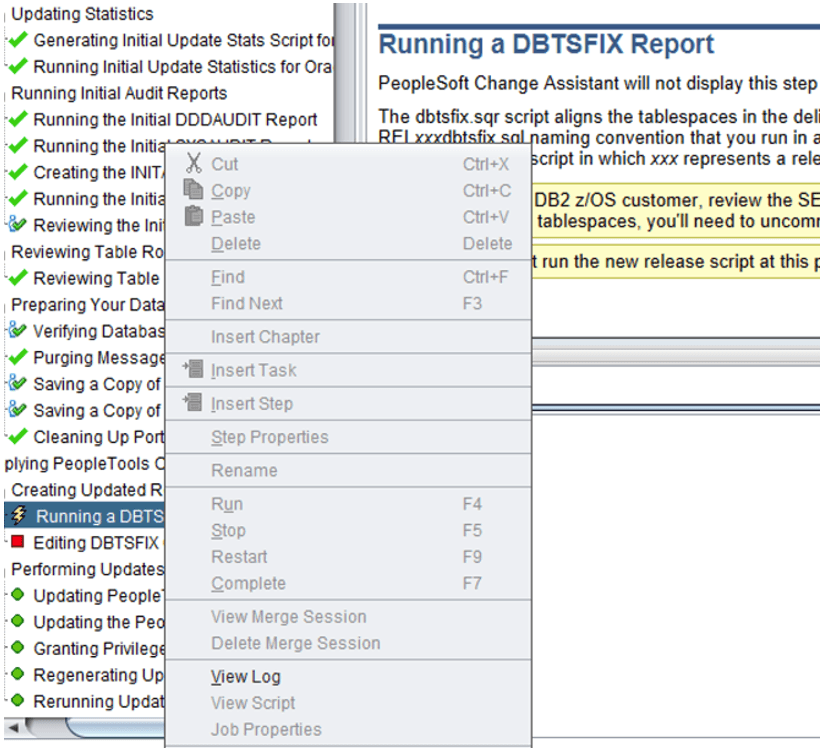
When these steps are run, a popup window with sub-steps is launched.
If you choose to close the sub-step popup window, it will not terminate the sub-step. You can re-open the sub-step popup window by selecting the View Log context menu.
If a sub-step is force stopped using the Force Stop (X) button, then the main step status is marked as Failed.
This information helps you restart the main step from the point of failure or run the step again.