Selecting All Other Search Criteria
Select the All Other Search Criteria radio button and click Next.
This example illustrates the fields and controls on the All Other Search Criteria. You can find definitions for the fields and controls later on this page.
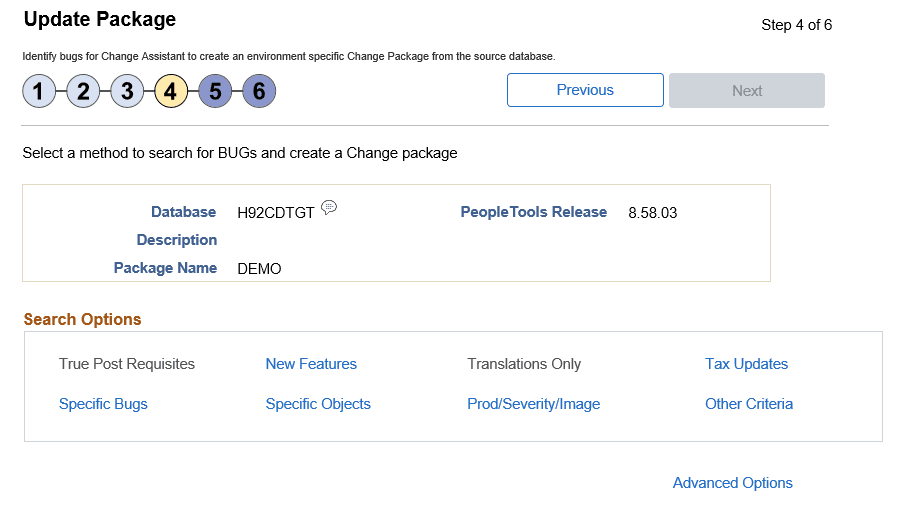
The search process is iterative. Once you have selected bugs into the search results gird, you can select another search option and add additional bugs to the search result grid. Search and selection can be performed in any order, the results are recalculated with each search.
| Field or Control | Description |
|---|---|
|
True Post Requisites |
When you select this option, the Search by True Post Requisites page is displayed. Users can use the Search button to display the post requisite bugs. Users have the option to select or deselect the bugs in the grid. If there are no unapplied true requisites for the target database, this option will be grayed out and not selectable. |
|
New Features |
Select this option to search for new features. Note: This option is equivalent to using the Advanced Search option in PeopleTools 8.54 and selecting the tracking group Enhancement with the value Enhancement. |
|
Translations Only |
When you select this option you see a field that allows you to select a language. If the target database is English Only, this link will be greyed out and not selectable. |
|
Tax Updates |
Select this option to search for tax updates. If there are no unapplied tax updates for the target database, this link will be greyed out and not selectable. |
|
Specific Bugs |
Select this option to search for updates related to specific Bug IDs. |
|
Specific Objects |
Select this option to search for updates related to specific PeopleSoft managed objects. |
|
Prod/Severity/Image |
Select this option to search for updates by various criteria such as Product, Severity, or Image. |
|
Other Criteria |
Other criteria covers any tracking groups for the application that are not covered in another search, such Legislative/Regulatory, Multi-instance, or PeopleTools Compatibility. Tracking groups will differ by product. If there are no unapplied other criteria for the target database, this link will be greyed out and not selectable. |
|
Advanced Options |
Select this link to set the dependency calculation. |