Setting SQR Report Output Options
To set SQR output options:
-
Insert a new step in the template and select Type SQRReport or open an existing step with the type SQRReport.
-
Enter the report name in the Script/Procedure field.
-
Click the Output Settings button.
This example illustrates the fields and controls on the SQR Output Settings dialog box. You can find definitions for the fields and controls later on this page.
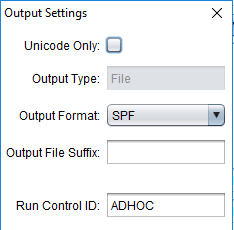
Field or Control Description Unicode Only
Select this checkbox for Unicode Only.
Output Type
Currently File is the only supported value and is read-only.
Output Format
Select the output format. The allowable output values are PDF, HTML, and SPF.
The default is SPF
Output File Suffix
Enter an output file suffix if applicable.
The suffix is used to create a unique output log file name for the step. A change package may run the same SQR multiple times, the suffix will ensure unique output log files.
Run Control ID
Enter the run control ID. The default is AD HOC.
-
Click OK.
-
Click OK on the step