Connecting to the Database to Create a Template and Submit Data
Your PeopleSoft login information is needed for both creating the template and submitting data to the database.
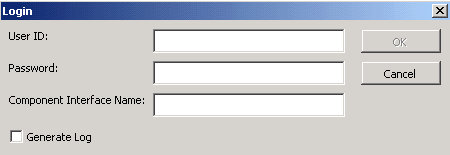
Access the Login dialog box by selecting the Template tab and then clicking the New Template button, or by clicking the Submit Data button on the Staging and Submission tab:
This example shows the Login dialog box for the Excel-to-Component Interface utility.
The system uses your user ID and password to ensure that you have the correct permissions to access the component interface that you are creating the template on. You must be granted permission to access the component interface that you are using.
| Field or Control | Description |
|---|---|
|
User ID/Password |
Enter your PeopleSoft user ID and password. |
|
Component Interface Name |
Enter the name of the component interface for which you want the template created. |
|
Generate Log |
Select the Generate Log check box to create one log file for ExcelToCI2007.xlsm and one for the SOAPTOCI Web Library. Note: Unless you are troubleshooting errors, you should run the Excel to Component Interface utility without creating log files. Logs should be generated for debugging purposes only. |
Related Topics