Creating Reference Properties
Each component interface is isolated and unaware of the other component interfaces in the system. To access and update information from other component interfaces, references establish relationships between component interfaces.
Create a reference property in one component interface to access data exposed in another component interface. For example, the Customer object and the component interface exposing its properties include properties such as the customer’s name, address, and telephone numbers. Another object, Contact, includes data associated with all contacts in the system. The link between a specific customer and its associated contacts is owned by the Contact record, not the Customer record.
Therefore, to access contact data, the Customer component interface needs a reference property referring to the Contact component interface. For you to update contact data from the Customer component interface, the reference must include a valid reference path and reference backpointer to the customer ID.
Access the Create Reference dialog box by right-clicking the property and selecting Create Reference.
This example illustrates the fields and controls on the Create Reference dialog box. You can find definitions for the fields and controls later on this page.
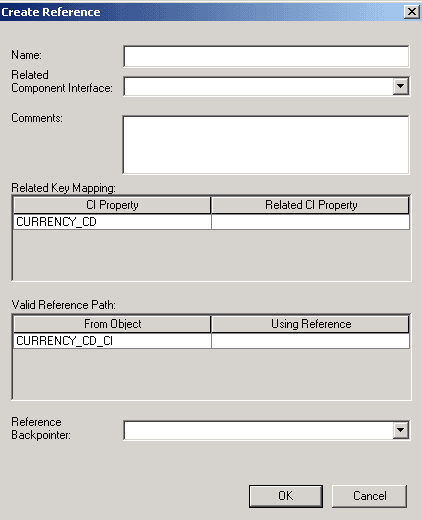
The Create Reference dialog box has the following fields:
| Field or Control | Description |
|---|---|
|
Name |
Describes the name of the reference you are creating. |
|
Related Component Interface |
Designates the component interface referenced from the current component interface. |
|
Comments |
Enter any comments to track the reference. |
|
Related Key Mapping |
Maps the property from the related component interface to the selected component interface property. |
|
Valid Reference Path |
Supports dynamic enumeration of the objects that can be selected as the value of the reference property being defined. This effectively filters these values so that you can select only objects that support the defined reference. Because references use the concept of a walkpath to go from level zero of one component interface to level zero of another component interface, and then “walk” down to the lower levels of the component interface, only the level zero references are displayed in the Valid Reference Path drop-down list of a reference definition. |
|
Reference Backpointer |
Refers to the path back to the original component interface. |