Renaming User-Defined Properties
Property names are automatically generated according to the corresponding fields from the component. If these names are cryptic, you might want to rename these properties to explain them better. Renaming a property does not change the field that the property references.
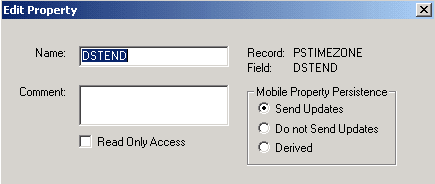
This example shows the Edit Property dialog box. Use this dialog box to rename user-defined properties for component interfaces.
Important:
PeopleSoft Mobile Agent is a desupported product. The options listed in the Mobile Property Persistence group box of the Edit Property dialog box exist for backward compatibility only.
To rename a property:
-
Double-click the property name or right-click the property name and select Edit Name from the menu.
-
Enter the new property name.
Programs accessing this component interface must reference the new property name. For example, if SDK_NAME was changed to NAME, programs must use NAME instead of SDK_NAME.
-
Add any comments that might be helpful.
-
Select the Read-Only check box to make this property read-only.
-
If this property is for a mobile application, select a radio button that sets the persistence of the property.
-
Send Updates is the default behavior for a mobile property.
Any changes or additions to this property on a mobile instance are synchronized to the server.
-
If a mobile property is set to Do not Send Updates, this property is not synchronized up to the server, but the value is maintained on the device.
-
A Derived property is used only at mobile runtime. Any values that are set or added to this property exist only for the runtime life of the object. No persistence of this data on the device exists, so it is subsequently never uploaded to the server.
-
Note:
PeopleSoft Application Designer generates an error message if it detects that a component interface has properties that resolve to the same name when creating, saving, or opening a given component interface.
For example, NAME1 and NAME_1 both resolve to the same name when PeopleSoft APIs are built.
The set and get functions that are generated for the properties RTE_CNTL_TYPE1 and RTE_CNTL_TYPE_1 are: public String getRteCntlType1(), and public void setRteCntlType1(String inRteCntlType1). To fix this condition, name the properties so that they do not resolve to the same name.