Applying and Maintaining Partitioning DDL
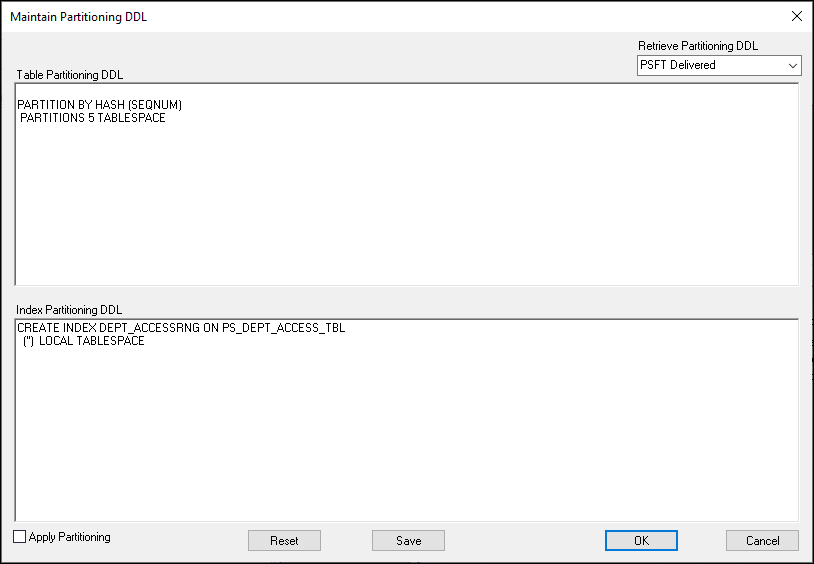
In PeopleSoft Application Designer, you review and apply partition DDL using the Maintain Partitioning DDL dialog. You can review DDL from the PeopleTools metadata tables or from the system catalog tables, and apply it. If partitioning DDL has not been defined, you can enter it directly here.
Navigation:
This example illustrates the Maintain Partitioning DDL dialog box.
WARNING:
PeopleTools performs no validation on the SQL that you enter in the table or index partitioning DDL edit boxes. It is your responsibility to ensure that the DDL SQL is correct.
| Field or Control | Description |
|---|---|
|
Retrieve Partitioning DDL |
Select the source of the partitioning DDL to view. Options are: PSFT Delivered: Choose this option to view DDL from the PeopleTools Metadata tables. This is the DDL that is generated by the partitioning attributes specified on the Partitioning page, in Establishing Partitioning Definitions (PPMU_GEN_DDL_PG) in PeopleSoft Internet Architecture. The table and index partitioning DDL is retrieved from the PS_PTTBLPARTDDL and PS_PTIDXPARTDDL tables, respectively. System Catalog Choose this option to view DDL from the Oracle database system catalog table. This enables you to review and apply any customized partitioning that is currently defined on your Oracle database instead of the PeopleTools partitioning DDL. |
|
Table Partitioning DDL |
This edit box contains the table partitioning DDL from the PeopleTools Metadata table or the system catalog, depending on the option selected in Retrieve Partitioning DDL. If no table partitioning is currently defined, then the edit box will be blank. You can review and modify the DDL, or enter the DDL if the table has none defined. |
|
Index Partitioning DDL |
This edit box contains the index partitioning DDL from the PeopleTools Metadata table or the system catalog, depending on the option selected in Retrieve Partitioning DDL. If no index partitioning is currently defined, then the edit box will be blank. You can review and modify the DDL, or enter the DDL if the table has none defined. |
|
Apply Partitioning |
Select this check box to specify that the system apply the partitioning DDL to the CREATE/ALTER TABLE DDL while altering/creating the table for this record. The value set for Apply Partitioning (Y if selected, N if deselected) is stored in the AUXFLAGMASK field of the PSRECDEFN table against the record name and it is used during the build process to determine if partitioning needs to be applied or not. You must build the record definition to update the PeopleTools and system catalog tables. During the build process this is reset to N. |
|
Reset |
Click to clear the contents of the Table Partitioning DDL and index Partitioning DDL edit boxes. |
|
Save |
Click to store the partitioning DDL in the PeopleTools metadata table. |
|
OK |
Click to save and exit the dialog box. |
|
Cancel |
Click to exit the dialog box without making any changes. |
Note:
The partitioning DDL is not automatically updated for subsequent table customizations.