Establishing Partitioning Definitions
To establish partitioning definitions, use the Partitioning page (PPMU_GEN_DDL_PG).
This page enables you to define partitioning parameters and generates the DDL scripts to create partitioned tables and indexes.
Navigation:
This example illustrates the fields and controls on the Partitioning page.
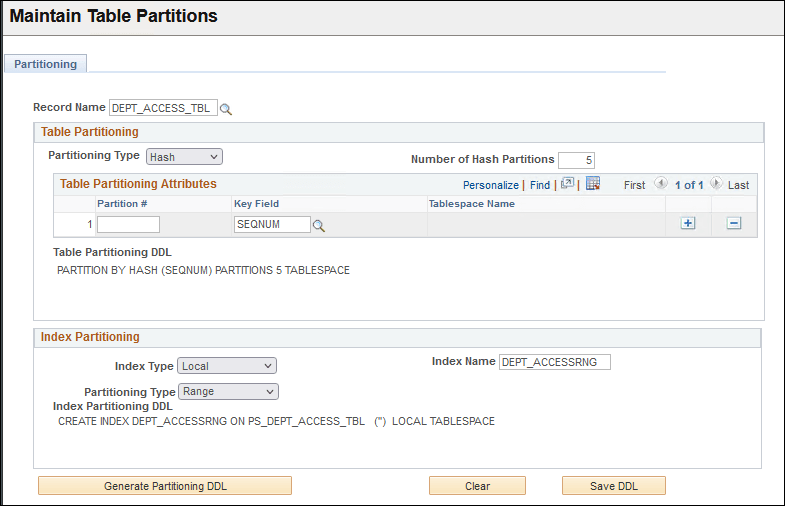
Complete the fields on this page to define table and/or index partitioning for a record, generate the partitioning DDL, revise the DDL (if required), and save the DDL.
| Field or Control | Description |
|---|---|
|
Record Name |
Select the table record for which to specify partitioning definitions. |
Table Partitioning
Complete the fields within the Table Partitioning group box to define table partitioning.
Hash, list, and range partitioning each have their own specific requirements:
-
For hash partitioning: Specify the number of hash partitions and the tablespace for each partition.
-
For list partitioning: Specify the partition name, the partition value, and the tablespace for each partition.
-
For range partitioning: Specify the partition name, the partition criteria, and the tablespace for each partition.
| Field or Control | Description |
|---|---|
|
Partitioning Type |
Select the partitioning type. Options are:
For definitions of these partitioning types, see Partitioning Terminology |
|
Sub Partitioning Required |
Select this check box if the table requires composite/sub partitioning. When you select this option, the sub-partitioning grid becomes available. This option is not available if the partitioning type is Hash. |
|
Number of Hash Partitions |
Enter the number of hash partitions to generate. This option is available only when the partitioning type is set to hash. |
|
Table Partitioning Attributes |
For each table partition, complete the following fields (the available fields differ depending on the partitioning type): For hash partitions: Partition # (partition number), Key Field, Tablespace Name. For list partitions: Partition #, Key Field, Key Value, Partition Name, Tablespace Name. For range: Partition #, Key Field, Key Value, Partition Name, Tablespace Name |
|
Sub Partitioning Type |
Select the sub partitioning type. Options are: Hash, List, and Range. The available options differ depending on the selected partitioning type. Only these sub-partitioning types are supported:
|
|
Templatize Sub Partition |
A display-only indicator that the system uses the sub partition definition as a sub partition template for each and every partition definition. |
|
Sub-Partitioning Attributes |
If the Sub Partitioning Required check box is selected, use the fields within this grid to specify sub-partitioning parameters. For each sub-partition, complete the following fields: Partition #, Key Field, Key Value, Partition Name, Tablespace Name. |
|
Table Partitioning DDL |
This edit box displays the database definition language (DDL) for the table partitioning options specified. Initially, this field is blank. The system populates this field when you click the Generate Partitioning DDL button. If this page has been previously used to define table partitioning for the record, then this box will display the currently defined DDL. |
Index Partitioning
Complete the fields within the Index Partitioning group box to define index partitioning.
Note:
Index partitioning is optional; a partitioned table does not require a partitioned index. If you change a table to a partitioned table, its existing indexes are generated as is with no change to the syntax. These “regular” indexes on a partitioned table are known as global non-partitioned indexes.
| Field or Control | Description |
|---|---|
|
Index Type |
Select the index type. Options are:
For definitions of these index types, see Partitioning Terminology |
|
Index Name |
Specify the index name. To avoid clashes, avoid using the regular PeopleSoft index naming convention for the index name. |
|
Partitioning Type |
Select the index partitioning type. Options are:
|
|
Index Partitioning Attributes |
For global partitioning index types only. Define the index partitioning attributes using the fields in this grid. The available fields differ depending on the index partitioning type. For hash partitions: Partition # (partition number), Key Field, Tablespace Name For list partitions: Partition #, Key Field, Key Value, Partition Name, Tablespace Name For range: Partition #, Key Field, Key Value, Partition Name, Tablespace Name |
|
Number of Hash Partitions |
Enter the number of hash partitions to generate. This option is available only when the index partitioning type is set to hash. |
|
Index Partitioning DDL |
This edit box displays the database definition language (DDL) for the index partitioning options specified. Initially, this field is blank. The system populates this field when you click the Generate Partitioning DDL button. Initially, this field is blank. The system populates this field when you click the Generate Partitioning DDL button. If this page has been previously used to define index partitioning for the record, then this box will display the currently defined DDL. |
If you create a partitioning index with keys that are identical to an existing global non-partitioned index, in order for the partitioning index to be used, you must disable generation of the previously defined global non-partitioned index using Application Designer by completing these steps:
-
In Application Designer, open the record.
-
Select .
-
Double-click the index name that has keys identical to the partitioned index.
The Edit Index dialog box opens.
-
Set the Platform radio button to Some.
-
Deselect the Oracle check box.
-
Click OK.
DDL Actions
| Field or Control | Description |
|---|---|
|
Generate Partitioning DDL |
Click to populate the Table Partitioning DDL and Index Partitioning DDL fields. |
|
Clear |
Click to clear all values in the page. |
|
Save DDL |
Click to save the DDL to the PeopleTools metadata tables. The DDL is written to these tables: The table partitioning DDL is stored in PS_PTTBLPARTDDL. The index partitioning DDL is stored in PS_PTIDXPARTDDL Only the Table and Index Partitioning DDL is stored. The Table/Index Partitioning attributes are not captured, to prevent synchronization issues with the system catalog. To apply the partition, in Application Designer, use the Maintain Partitioning DDL dialog to apply the partitioning and build (alter) the record. At that point the DDL from the definition is applied, and updates the Oracle database system catalog. |