Defining Archive Jobs
Access the Archive Data To History page (select PeopleTools, then Data Archive Manager, and then Archive Data to History).
This example illustrates the fields and controls on the Archive Data To History page
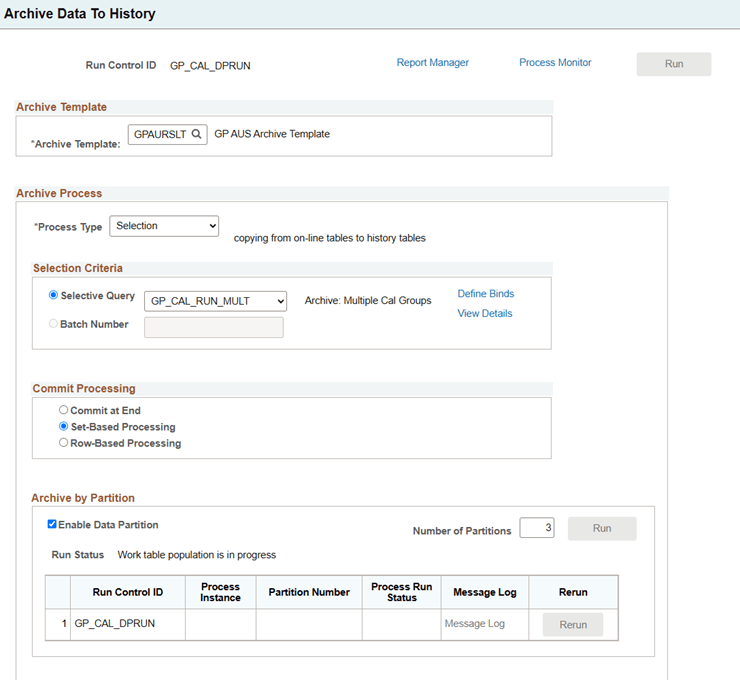
| Field or Control | Description |
|---|---|
|
Archive Template |
Select the archive template to use for this batch job. Choosing a restore or an archive template is the way you choose the type of job to run. |
|
Run |
Click to run this batch job after defining the archive process and commit processing. |
|
Report Manager |
Click this to view reports. For more information about viewing reports, see Process Scheduler: Viewing Reports |
|
Process Monitor |
Click this to review the status of scheduled or running processes. For more information about viewing the status of processes, see Process Scheduler: Viewing the Status of Processes |
Archive Process
Use this section to manage the processes that are associated with the selected archive template. As the archiving process runs, counters are inserted into work tables to indicate which records have been processed (for both set-based and row-based operations) and the number of rows processed (for row-based operations only).
For commits by table, the database server commits only after each record is processed. If the process fails in the middle of processing a record (say, the database logs were full), it will perform a rollback of everything that has not committed.
For commits by row, if the process fails for any reason, the counters keep track of only those rows that have been committed to the database. When the Application Engine job is restarted, it skips all the rows that have been committed, and begins with the first uncommitted row.
| Field or Control | Description |
|---|---|
|
Process Type |
Select an option:
|
|
Selective Query |
Specify the archive or restore query defined within the archive template to use at run time. If there are bind variables, you will be prompted to enter the bind variables when you select the Define Binds link. |
|
View Details |
Select this link to access the Archive Run Control Details page to view the SQL and row counts of this batch job. You see this link when you pick a relevant Selective Query. Note: If you're using bind variables, you must save the run control data before selecting the View Details link. See Viewing Details. |
|
Define Binds |
Select this link to access the Define Query Bind Variables page. You see this link when the query contains binds. |
|
Batch Number |
For archiving processes that are based on data in the history tables (such as delete data from transactional tables, copy data from history tables to transactional tables, and delete data from history tables), you will be prompted to enter or search for an Archive Batch Number. |
|
Audit Row Count |
Select to audit the number of rows in the record that meet the criteria. This number is displayed in the Number of Rows field on the Audit Archiving page. |
Commit Processing
By default, batch processing is performed by the Data Archive Manager using set-based processing. Unless specified using the check boxes below, a commit is issued to the database after each table is processed within the Archive Template.
| Field or Control | Description |
|---|---|
|
Commit at End |
Data Archive Manager processes data using set-based processing, but doesn't issue any commits to the database server until the entire process has completed. For example, if your Archive Template is defined with Pre- and Post-AE programs, the Data Archive Manager will first run the Pre-AE program, then it will process all of the tables in the Archive Template, then it will run the Post-AE program. Upon successful completion of all these steps, a commit will be issued to the database. When you select this option, the set-based processing option is automatically selected as well. |
|
Commit by Table |
Data is processed by passing a single SQL statement per record to be archived to the database server. A commit is issued to the database server after successful completion of each SQL statement. |
|
Commit by Row |
Data Archive Manager processes data one row at a time using PeopleCode fetches. This method of archiving is more memory intensive and takes longer than set-based processing. However, for archiving processes that contain significant amounts of data, row-based processing could be used to reduce adverse affects on the database server. Row-based processing is appropriate when you're archiving large amounts of data from transactional tables and wish to issue commits more frequently. If you select this option, you must enter a commit frequency. |
|
Commit Frequency |
Specify the number of rows to process before issuing a commit to the database. |
Archive by Partition
Enable data partitioning for the set of data being archived.
See Using Data Partitioning for Archiving.
| Field or Control | Description |
|---|---|
|
Enable Data Partition |
Select to enable data partitioning |
|
Number of Partitions |
Select the number of partitions. |
|
Run Control ID |
Displays the run control ID. |
|
Process Instance |
Displays the process instance number. |
|
Partition Number |
Displays the partition number. |
|
Process Run Status |
Displays the process run status. |
|
Message Log |
Select the link to view the process message. |
|
Rerun |
Click to rerun the selected process. |