Maintaining Indexed Views/Summary Tables
You can access the Materialized View Maintenance page if you are granted the Materialized View Administrator role. On this page you can select the indexed views and the summary tables for a refresh. A refresh happens when the data in tables are synchronized with the indexed views or summary tables. You can also get information on the staleness and last refresh date of the views.
Access the Materialized View Maintenance run control page. Select . Select a run control or add a new one.
The page displays information on summary tables and indexed views. You can select a view to refresh its index. The grid on this page is populated with a list of the records in the materialized views table, PSPTMATVWDEFN.
This example illustrates the Materialized View Maintenance page, followed by the description of the fields and controls on the page.
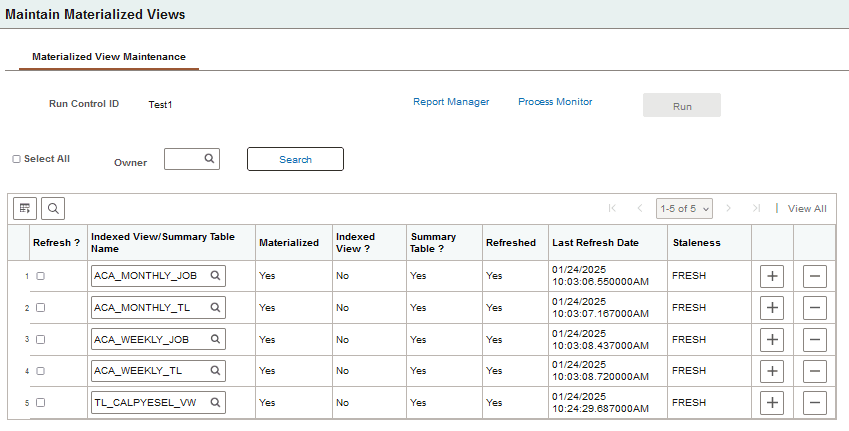
| Field or Control | Description |
|---|---|
|
Owner |
Search and select a specific owner to limit the grid to records that belong to that owner. |
|
Select All |
Select this option to choose all of the rows. |
|
Refresh? |
Select this option to schedule a refresh for the record. |
|
Indexed View/Summary Table Name |
Enter the name of the indexed view or summary table. You can use the prompt for selecting the name. |
|
Materialized |
Displays if the indexed view or summary table is materialized in the database which makes them readily available in the database and the query does not have to be run again. |
|
Indexed View? |
Displays Yes, if the materialized view is an Indexed View. |
|
Summary Table? |
Displays Yes, if the materialized view is a Summary Table. |
|
Refreshed |
Indicates if the record is refreshed (Yes) or not (No). |
|
Last Refresh Date |
List the date and time the record was last refreshed. |
|
Staleness |
Indicates if the record is stale or fresh based on the Microsoft SQL System Catalog. |
|
Run |
Click to run the PTMATREFVW Application Engine program, to refresh the selected records. |
On the page, select the indexed views/summary tables to refresh. Click the Save button. On saving the page, the Run button gets enabled.
Click the Run button. The Process Scheduler Request page with PTMATREFVW process is displayed. Click the OK button to initiate the process. The Application Engine program PTMATREFVW executes and recreates the indexes for each of the selected indexed views/summary tables.
For more information on Process Scheduler Request page see, Maintaining Materialized Views documented under the Oracle platform section.