Defining XML Schema Details
Use the Document Builder - XML page (IB_XMLSCHEMA) to define XML schema details for a document. This page enables you to define root tag names and namespace prefixes, include or exclude the schema reference in the generated XML, filter blank elements, and more.
To access the page, select PeopleTools, Documents, Document Builder and click the XML tab.
This example illustrates the fields and controls on the Document Builder - XML page. You can find definitions for the fields and controls later on this page.
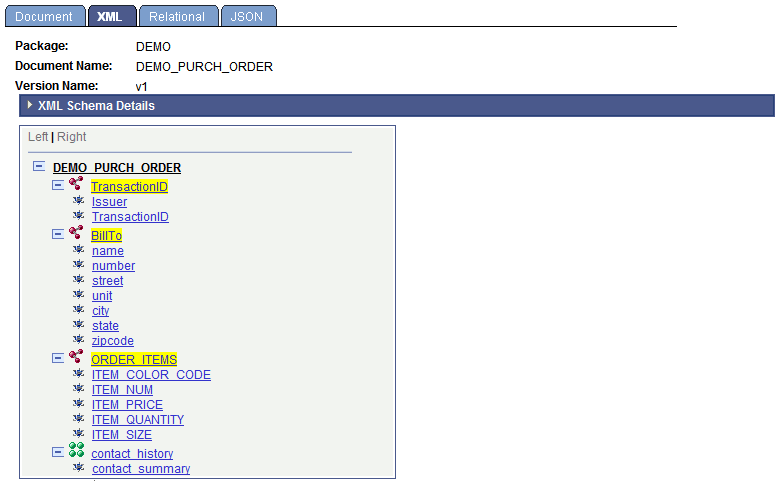
When you initially open the Document Builder - XML page, the XML Schema Details section is collapsed. Click the arrow icon next to the XML Schema Details label to expand the section.
This example shows the XML Schema Details section of the Document Builder – XML page expanded.
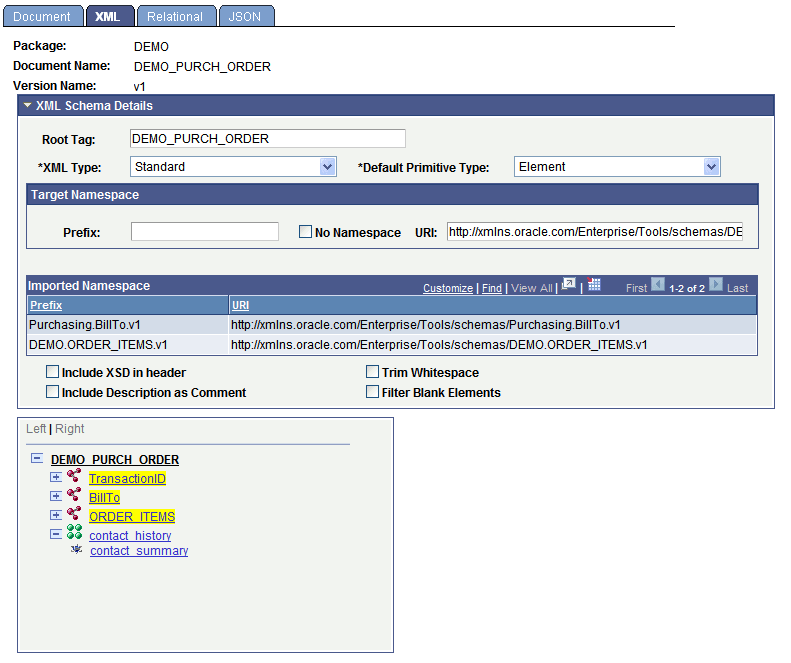
The following page elements appear in the XML Schema Details section:
| Field or Control | Description |
|---|---|
|
Root Tag |
(Optional) Enter the root tag as it is to appear in the XML document schema. By default, the system populates the field with the document name. By default, the system populates the field with the only the first 30 characters of the document name. However, the full document name, up to the document name character limit of 100, appears in the generated XML document schema. The exception is if you modify the Root Tag field and overwrite the default with a new value; if you choose to do so, that value is used as the root tag element in generated schema. See Understanding Naming Document Definitions and XML Root Tag Names. |
|
XML Type |
Select the XML type from the drop-down list. Currently, Standard is the only available XML type and is the default value. |
|
Default Primitive Type |
Select a value from the drop-down list. The options are:
|
|
Prefix |
(Optional) Enter a target namespace prefix. |
|
No Namespace |
(Optional) Select the check box to exclude the document target namespace from the XML schema. You can still use a prefix with this option enabled. Use this option when you want the document to be used as a child document. The document will use the target namespace of the parent. This option enables you to create libraries with schemas that are namespace transparent. |
|
URI |
Enter a target namespace. By default, the system uses the target namespace defined on the Integration Broker Service Configuration page. |
|
Imported Namespace Section |
This section displays the namespace prefix and URI of imported document namespaces. When you add a compound element that is a document data type to a document, the namespace prefix and URI are imported into the document definition. |
|
Include XSD in header |
(Optional) Select the check box to include the schema reference in the generated XML. |
|
Trim Whitespace |
(Optional) Select the check box to trim leading and trailing whitespace in the generated XML. |
|
Include Description as Comment |
(Optional) Select the check box to include descriptions in the generated XML schema. |
|
Filter Blank Elements |
(Optional) Select the check box to exclude blank elements in the generated XML. The IsChanged property must be false for primitive PeopleCode objects. |