Defining Advanced Options for Worklist Feeds
Access the Advanced Feed Options page (click the Advanced Options link on the Publish Feed Definition page).
This example illustrates the fields and controls on the Worklist - Advanced Feed Options page. You can find definitions for the fields and controls later on this page.
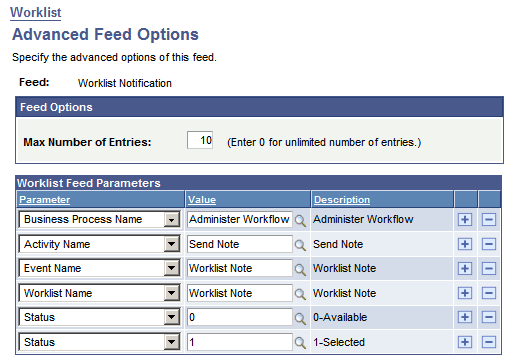
Use the Advanced Feed Options page to determine which worklists and worklist items are to be published in the worklist feed.
| Field or Control | Description |
|---|---|
|
Max Number of Entries |
Enter the maximum number of entries that the feed should return to the user. Enter 0 for unlimited entries up to the maximum row limit specified on the Feed Options page, which is 300 by default. Note: You can configure the upper limit on the Feed Options page. |
|
Worklist Feed Parameters |
Select the parameters and values for the worklists and worklist items that you want to publish. A status of 0 (available) or 1 (selected) will always be included in the feed parameters. After a worklist item is worked, it will no longer appear in the feed. Note: Even if rows for statuses 0 and 1 are deleted from the grid, worklist feeds will always show all available and selected worklist items. |
|
Reset to Defaults |
Click to reset advanced options to their default values. |
Worklist Feed Parameters
This table lists worklist feed parameters, selectable values, and their data source parameter names:
| Worklist Parameter | Values | Data Source Parameter |
|---|---|---|
|
Activity Name |
Select from any workflow activity. |
ACTIVITYNAME |
|
Business Process Name |
Select from any business process. |
BUSPROCNAME |
|
Event Name |
Select from any event. |
EVENTNAME |
|
From |
Select from any user. |
ORIGINATORID |
|
Priority |
1 (high), 2 (medium), or 3 (low) |
WL_PRIORITY |
|
Status |
0 (available) or 1 (selected) |
INSTSTATUS |
|
Timed Out |
0 (available) or 1 (timed out) |
TIMEDOUT |
|
Worklist Name |
Select from any worklist. |
WORKLISTNAME |
Note:
The Priority parameter denotes the priority that the user that is the receiver of the notification has assigned to the worklist item in the Worklist page and not the priority with which the worklist item was created.
When you specify multiple feed parameters, similar parameters use OR, while distinct parameters use AND in the WHERE clause. For example, consider the following list of worklist feed parameters and runtime values:
| Worklist Parameter | Runtime Value |
|---|---|
|
Business Process Name |
Administer Workflow |
|
Activity Name |
Send Note |
|
Event Name |
Worklist Note |
|
Worklist Name |
Worklist Note |
|
Priority |
1 |
|
Status |
1 |
|
Status |
0 |
|
Timed Out |
0 |
|
From |
PSADMIN |
|
From |
PTSECADM |
The WHERE clause for the SQL statement generated for the parameters shown in the preceding table is:
WHERE (BUSPROCNAME=’Administer Workflow’) AND (ACTIVITYNAME =’Send Note’) AND  ⇒
(EVENTNAME=’Worklist Note’) AND (WORKLISTNAME=’Worklist Note’) AND ⇒
(WL_PRIORITY=’1’) AND ((INSTSTATUS=0) OR (INSTSTATUS=1)) AND (TIMEDOUT=0) AND⇒
((ORIGINATORID=’PSADMIN’) OR (ORIGINATORID=’PTSECADM’))
This table describes how the Feed Publishing Framework automatically maps the feed properties to Atom 1.0 data source parameters:
| Feed Property | Data Source Parameter |
|---|---|
|
Author |
ORIGINATORID and primary email address |
|
Category |
BUSPROCNAME, ACTIVITYNAME, EVENTNAME, WORKLISTNAME, WL_PRIORITY, TIMEDOUT, INSTSTATUS, ORIGINATORID |
|
ContentURL |
Worklist entry URL |
|
Copyright |
None |
|
Contributor |
None |
|
Description |
BUSPROCNAME | "/" | ACTIVTYNAME | "/" | EVENTNAME Created On: INSTAVAILABLEDTTM Instance ID: INSTANCEID From: ORIGINATORID |
|
Enclosure |
None |
|
FullContent |
None |
|
GUID |
Worklist URL | “ “ | INSTAVAILABLEDTTM |
|
Published |
INSTAVAILABLEDTTM |
|
Title |
INSTANCEID | "." | BUSPROCNAME | "/" | ACTIVTYNAME | "/" | EVENTNAME |
|
Updated |
LASTUPDDTTM |
Note:
INSTAVAILABLEDTTM is the time at which the worklist item was created.
LASTUPDDTTM is the time at which the worklist item was last updated or selected.