Defining Feed Categories
Access the Define Feed Categories page (PeopleTools, Feeds, Define Feed Categories).
This example illustrates the fields and controls on the Define Feed Categories page. You can find definitions for the fields and controls later on this page.
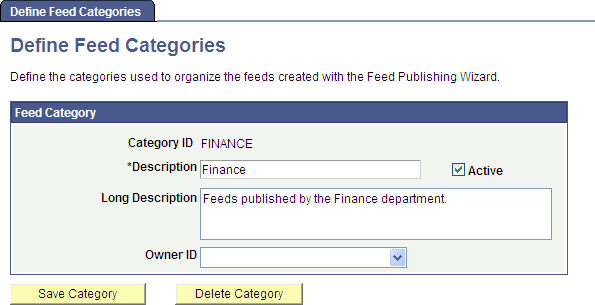
Use the Define Feed Categories page to manage categories used to organize feeds.
| Field or Control | Description |
|---|---|
|
Category ID |
Specify a unique ID for the feed category. Note: The category ID is a user-specified, not system-defined, value. |
|
Description |
Enter a short description for the feed category. This description appears wherever a category can be assigned to a feed definition and in locations where you can search for feeds. |
|
Active |
Indicate whether the feed category is active or inactive. An inactive category is not available to assign to feed definitions or in locations where you can search for feeds. However, if a feed definition is assigned to a category and then that category is made inactive, the feed definition no longer displays an assigned category. |
|
Long Description |
Enter a long description for the feed category. |
|
Owner ID |
Select the owner ID for the feed category. The owner ID is a way to identify which definitions are owned by which PeopleSoft applications, such as PeopleSoft General Ledger, Accounts Receivables, PeopleTools, and so on. The values in the drop-down list box are Translate table values associated with the OBJECTOWNERID field. |
|
Save Category |
Click to save the feed category. |
|
Delete Category |
Click to delete the feed category. If a feed definition is assigned to a category and then that category is deleted, the feed definition no longer displays an assigned category. |