Step 1: Specifying Feed Properties
Access the Feed Publishing Wizard - Specify Feed Properties page (; or click the Go to Feed Publishing Wizard link on any Publish Feed Definition page).
This example illustrates the fields and controls on the Feed Publishing Wizard - Specify Feed Properties page. You can find definitions for the fields and controls later on this page.
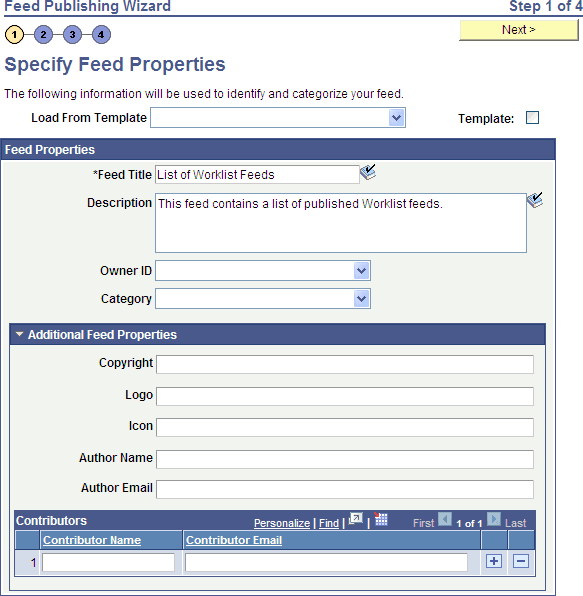
Use the Specify Feed Properties page to define feed properties, such as the feed title, as well as advanced feed properties.
| Field or Control | Description |
|---|---|
|
Load From Template |
The list displays all the available feed templates in the system. Selecting a feed template loads the current feed definition with values from the template. |
|
Template |
Select this option to make the current feed definition a feed template. Important: Unlike the Save As Template link, this option does not create a new object. If you are editing an existing feed definition, the feed definition will be converted into a feed template, which means that the feed itself will no longer be available. Conversely, if you are editing a feed template and deselect this option, the feed template will be converted to a feed definition. |
Feed Properties
| Field or Control | Description |
|---|---|
|
Feed Title |
Enter a short description for this feed at a maximum of 30 characters. |
|
Description |
Enter no more than a 254-character description of the feed. |
|
Owner ID |
Select the owner ID for the feed definition. The owner ID is a way to identify which definitions are owned by which PeopleSoft applications, such as PeopleSoft General Ledger, Accounts Receivables, PeopleTools, and so on. The values in the drop-down list box are Translate table values associated with the OBJECTOWNERID field. Note: The owner ID does not appear in the published feed document. |
|
Category |
Select a category for the feed definition from the list of active categories. If a feed definition is assigned to a category and then that category is deleted, the feed definition no longer displays an assigned category. |
Additional Feed Properties
Not all feed readers display all feed properties. This list describes the additional feed properties that some feed readers process and display.
Note:
Values entered in these fields replace the default feed property values defined at the feed data type level.
See Creating the Feed Data Type Definition.
| Field or Control | Description |
|---|---|
|
Copyright |
Enter a copyright date to be included in the feed document. |
|
Logo |
Enter a URL to the logo to be included in the feed document, for example: http://myserver.example.com:80/images/logo.gif |
|
Icon |
Enter a URL to an icon to be included in the feed document, for example: http://myserver.example.com:80/images/icon.gif |
|
Author Name |
Enter the author's name to be included in the feed document. |
|
Author Email |
Enter the author's email address to be included in the feed document. |
|
Contributor Name |
Enter a contributor's name to be included in the feed document. |
|
Contributor Email |
Enter the contributor's email address to be included in the feed document. |