AJAX Transfers
AJAX transfers, or asynchronous in-place transfers, use AJAX (asynchronous JavaScript and XML) technology to allow component-to-component transfers to occur without exiting from the fluid wrapper (fluid activity guide or master/detail component) that contains the source component from which the transfer was invoked. AJAX transfers apply to four PeopleCode functions only: Transfer, TransferExact, ViewContentURLClassic, and ViewContentURLFluid.
When AJAX transfers are not enabled (the default), the action exits the fluid wrapper and the content replaces the current window. If the transfer function is set to open a new window, the action opens a new window instead.
When AJAX transfers are enabled, the new content is displayed in the target content area of the fluid wrapper when the target is set to current window. If the transfer function is set to open a new window, this new window setting is overridden and the new content is also displayed in the target content area of the fluid wrapper except when the transfer is from classic content to other classic content. In that case, the new window setting is honored and the classic content is opened in a new window.
- Fluid banner — With fluid activity guides, the content of the fluid banner is maintained by the activity guide. With master/detail components, the content is maintained by the individual components displayed in the target content area.
- Optional sub-banner — With fluid activity guides, the content of the sub-banner is maintained by the activity guide.
- Navigation panel — The items in the navigation panel are presented by the fluid wrapper component.
- Target content area — The component selected in the navigation panel is displayed in the target content area.
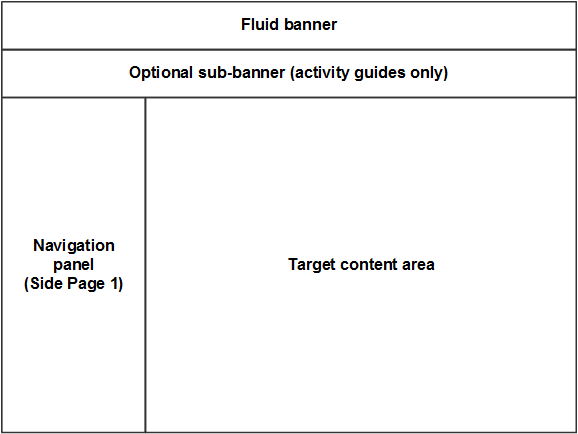
Since AJAX transfers are disabled by default, you must explicitly enable AJAX transfers on each fluid wrapper where the behavior is desired:
-
For fluid activity guides including fluid navigation collections, add the following query string parameter to the URL for the content reference definition that launches the activity guide: &AJAXTransfer=y
-
For master/detail components, add the following query string parameter to the URL for the content reference definition that launches the master/detail component: &ICAJAXTrf=true
-
If you are creating a custom fluid wrapper definition in Application Designer (that is, a custom master/detail component or a custom activity guide component), use the SetMDAJAXTrf function.
In addition, when you enable AJAX transfers, then you might also need enable a slide-out left panel to prevent inadvertent left panel collisions:
-
For master/detail components, fluid activity guides, and fluid navigation collections, add the following query string parameter to the URL for the content reference definition that launches the fluid wrapper: &ICMDListSlideout=true
-
If you are creating a custom fluid wrapper component definition, use the SetMDListSlideout function.
Related Topics
- PeopleCode Language Reference: SetMDAJAXTrf function
- PeopleCode Language Reference: SetMDListSlideout function
- PeopleCode Language Reference: Transfer function
- PeopleCode Language Reference: TransferExact function
- PeopleCode Language Reference: ViewContentURLClassic function
- PeopleCode Language Reference: ViewContentURLFluid function
- Left Panel Collision Handling with Slide-out Left Panels