Configuring User Data Mapping
Use the User Data Mapping page to configure an application package, class, and method to supply the email addresses and phone numbers that users select from when personalizing their notification preferences.
Navigation:
In the left panel of the Notification Administration fluid navigation collection, select the User Data Mapping item.
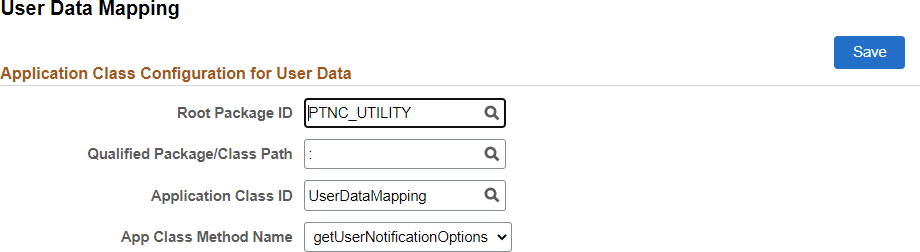
This example illustrates the fields and controls on the User Data Mapping page. You can find definitions for the fields and controls later on this page.
| Field or Control | Description |
|---|---|
|
Root Package ID |
Select the name of the application package that contains the method to be invoked. |
|
Qualified Package/Class Path |
Select the names of each subpackage in the application class hierarchy that define the location of the application class. Separate subpackage names by a colon. If the class is defined in the top-level application package, enter or select the colon. |
|
Application Class ID |
Select the name of the application class that contains the method to be invoked. |
|
App Class Method Name |
Select the method to be invoked to retrieve and return user email address and phone number data. The method must return the data in a Rowset object based on the PTNC_USER_DATA record definition. |
PeopleTools delivers a default PTNC_UTILITY:UserDataMapping.getUserNotificationOptions method that retrieves email addresses from the user profile and a phone number from My Preferences if one has been defined there. PeopleSoft application pillars will deliver user data mapping that is specific to where users enter contact information in that application pillar.