Configuring Inbound Message Handlers
Use the Inbound Message Handler page to configure message handlers for inbound text messaging.
Important:
You must establish an account with Twilio in order to use inbound message handlers. See the section titled “Defining the PTTEXTMESSAGING URL Identifier” in Managing Global Settings.
Navigation:
In the left panel of the Notification Administration fluid navigation collection, select the Inbound Message Handler item.
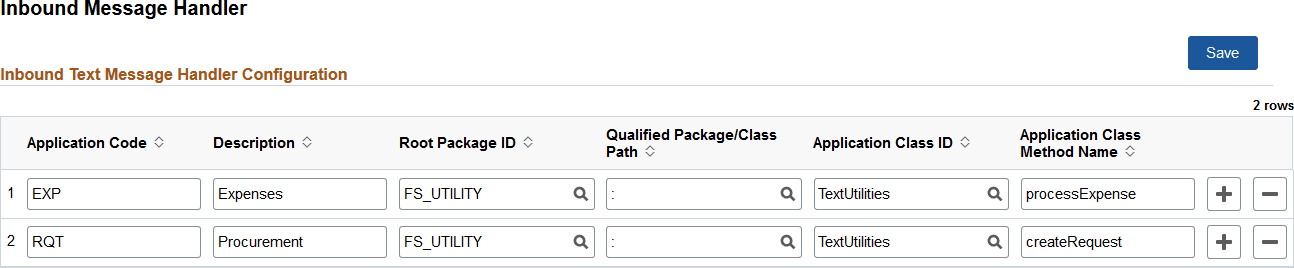
This example illustrates the fields and controls on the Inbound Message Handler page. You can find definitions for the fields and controls later on this page.
| Field or Control | Description |
|---|---|
|
Application Code |
Enter a unique three-character code identifying the PeopleSoft application represented by this inbound message handler. |
|
Description |
Enter a description for this application. |
|
Root Package ID |
Select the name of the application package that contains the inbound message handler to be invoked. |
|
Qualified Package/Class Path |
Select the names of each subpackage in the application class hierarchy that define the location of the application class. Separate subpackage names by a colon. If the class is defined in the top-level application package, enter or select the colon. |
|
Application Class ID |
Select the name of the application class that contains the inbound message handler to be invoked. |
|
App Class Method Name |
Select the method to be invoked to process inbound text messages. The handler should process the three-character code and message payload to invoke the appropriate PeopleSoft transaction on behalf of the user associated with the sender’s phone number. |