Creating Views for Two Base Tables and One Related Language Table
When you join two tables, one of which has a related language record, the SELECT statement becomes only slightly more complex.
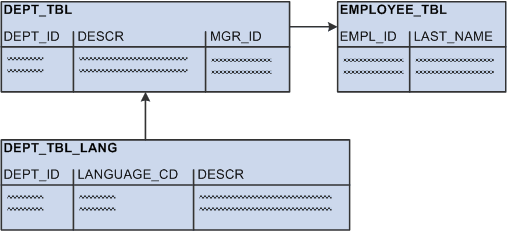
The following diagram shows the addition of EMPLOYEE_TBL to the previous diagram. DEPT_TBL has a many-to-one relationship with EMPLOYEE_TBL, which has one key column (EMPL_ID) and one non-language-sensitive column (LAST_NAME). The same one-to-many relationship as depicted previously exists between DEPT_TBL and the related language record, DEPT_TBL_LANG:
This diagram illustrates views of two base tables, one related language table
As an example, DEPT_TBL contains the same data as listed previously:
| DEPT_ID | DESCR | MGR_ID |
|---|---|---|
|
110 |
Finance |
01732 |
|
120 |
Engineering |
22056 |
|
131 |
Sales - Belgium |
08630 |
|
132 |
Sales - Germany |
08630 |
|
133 |
Sales - UK |
12972 |
|
134 |
Sales - Japan |
28553 |
The related language table, DEPT_TBL_LANG, also contains the same data:
| DEPT_ID | LANGUAGE_CD | DESCR |
|---|---|---|
|
110 |
FRA |
Finances |
|
110 |
GER |
Finanzierung |
|
120 |
FRA |
Technologie |
|
120 |
GER |
Technik |
|
131 |
FRA |
Ventes - Belgique |
|
132 |
GER |
Verkäufe - Deutschland |
|
133 |
GER |
Verkäufe - GB |
Finally, EMPLOYEE_TBL contains the following data:
| EMPL_ID | LAST_NAME |
|---|---|
|
01732 |
Jones |
|
08630 |
Gräff |
|
12972 |
Smythe |
|
17145 |
De Bruecker |
|
22056 |
Agarwal |
|
28553 |
Katsuhiro |
The following SELECT statement for the base view selects the department ID, description, and the last name of the manager for each department. The department description is language-sensitive, but the employee last name is not.
SELECT A.DEPT_ID, A.DESCR, B.LASTNAME
FROM
  DEPT_TBL A,
  EMPLOYEE_TBL B
WHERE A.MANAGER_ID = B.EMPL_ID
The following SELECT statement is for the related language view:
SELECT A.DEPT_ID, C.DESCR, B.LASTNAME, C.LANGUAGE_CD
FROM
  DEPT_TBL A,
  EMPLOYEE_TBL B,
  DEPT_TBL_LANG C
WHERE A. MGR_ID = B.EMPL_ID
  AND A.DEPT_ID = C.DEPT_ID
As an example of a view used in PeopleTools, the following SELECT statement builds the PeopleTools view (PTLT_FEATFLTRVW). The base view selects one key column (PTLT_FEATURE_CODE) and one language-sensitive column (PTLT_FEATURE) from the base table (PTLT_FEATURE) while joining additional data (PTLT_PROJ_NAME) from another base table (PTLT_PROJ_DEFN):
SELECT DISTINCT
  A.PTLT_PROJ_NAME,
  D.PTLT_FEATURE_CODE,
  D.PTLT_FEATURE
FROM
  PTLT_PROJ_DEFN A,
  PTLT_PROJ_TASK B,
  PTLT_ASSGN_TASK C,
  PTLT_FEATURE D
WHERE A.PTLT_PROJ_NAME = B.PTLT_PROJ_NAME
  AND B.PTLT_TASK_CODE = C.PTLT_TASK_CODE
  AND C.PTLT_FEATURE_CODE = D.PTLT_FEATURE_CODE
The following SELECT statement is for the related language view (PTLT_FEATFL_LVW). In this view, the key field, language-sensitive data, and the language code are selected from the related language table (PTLT_FEAT_LANG):
SELECT DISTINCT
  A.PTLT_PROJ_NAME,
  D.PTLT_FEATURE_CODE,
  D.PTLT_FEATURE,
  D.LANGUAGE_CD
FROM
  PTLT_PROJ_DEFN A,
  PTLT_PROJ_TASK B,
  PTLT_ASSGN_TASK C,PTLT_FEAT_LANG D
WHERE A.PTLT_PROJ_NAME = B.PTLT_PROJ_NAME
  AND B.PTLT_TASK_CODE = C.PTLT_TASK_CODE
  AND C.PTLT_FEATURE_CODE = D.PTLT_FEATURE_CODE
This related language view differs from the base view in only two ways:
-
The name of the table from which it selects.
-
The addition of the LANGUAGE_CD column.