Creating Views for Two Base Tables and Two Related Language Tables
When you join two tables that both have related language records, the SELECT statement becomes complex.
The following diagram shows a new many-to-one relationship of DEPT_TBL to LOCATION_TBL. Unlike the previous examples, DEPT_TBL includes a LOCATION column rather than a MGR_ID column. LOCATION_TBL includes a key column (LOCATION) and a language-sensitive column (DESCR). The same relationship as depicted previously exists between the related language record, DEPT_TBL_LANG, and DEPT_TBL. In addition, there is a one-to-many relationship between LOCATION_TBL and its related language record, LOCATION_TBL_LANG, which includes LOCATION, LANGUAGE_CD, and DESCR:
This diagram illustrates views of two base tables, two related language tables
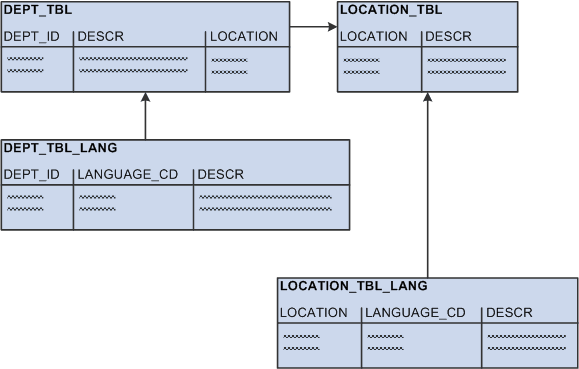
Unlike the previous examples, DEPT_TBL includes a LOCATION column with data rather than a MGR_ID column:
| DEPT_ID | DESCR | LOCATION |
|---|---|---|
|
110 |
Finance |
RWS |
|
120 |
Engineering |
RWS |
|
131 |
Sales - Belgium |
BRU |
|
132 |
Sales - Germany |
MUN |
|
133 |
Sales - UK |
LON |
|
134 |
Sales - Japan |
OSA |
The related language table, DEPT_TBL_LANG, contains the same data as previously:
| DEPT_ID | LANGUAGE_CD | DESCR |
|---|---|---|
|
110 |
FRA |
Finances |
|
110 |
GER |
Finanzierung |
|
120 |
FRA |
Technologie |
|
120 |
GER |
Technik |
|
131 |
FRA |
Ventes - Belgique |
|
132 |
GER |
Verkäufe - Deutschland |
|
133 |
GER |
Verkäufe - GB |
LOCATION_TBL contains location codes and descriptions:
| LOCATION | DESCR |
|---|---|
|
RWS |
Redwood Shores |
|
BRU |
Brussels |
|
MUN |
Munich |
|
LON |
London |
|
OSA |
Osaka |
Finally, LOCATION_TBL_LANG contains translations of the language-sensitive field, DESCR:
| LOCATION | LANGUAGE_CD | DESCR |
|---|---|---|
|
BRU |
FRA |
Bruxelles |
|
BRU |
GER |
Brüssel |
|
LON |
FRA |
Londres |
|
MUN |
GER |
München |
In this example, the base view joins DEPT_TBL with LOCATION_TBL to retrieve the location of the department. The following SELECT statement is for the base view:
SELECT A.DEPT_ID, A.DESCR, B.LOCATION, B.DESCR
FROM
  DEPT_TBL A,
  LOCATION_TBL B
WHERE A.LOCATION = B.LOCATION
However, in this example, creating the related language view is difficult because both tables referenced in the base view have related language records. Because the related language architecture does not require that all rows have translations, creating the related language view is not as simple as joining DEPT_TBL_LANG with LOCATION_TBL_LANG.
The related language view needs to take into account the following scenarios:
-
A translated department may reference a translated location—for example, the German for department 132 (Verkäufe – Deutschland) references the German for location MUN (München).
-
A translated department may reference an untranslated location—for example, the French for department 120 (Technologie) does not have a translated location and therefore references the untranslated location for RWS (Redwood Shores).
In this scenario, there is a row in DEPT_TBL_LANG, but there is no row in LOCATION_TBL_LANG. If you were to join DEPT_TBL_LANG with LOCATION_TBL_LANG in the view, no translation would be retrieved by the related language view because the location doesn’t have a translation.
-
A translated location may reference an untranslated department —for example, the German for location BRU (Brüssel) does not have a translated department and therefore references the untranslated department for 131 (Sales - Belgium).
In this scenario, there is a row in LOCATION_TBL_LANG, but there is no row in DEPT_TBL_LANG. If you were to join LOCATION_TBL_LANG with DEPT_TBL_LANG in the view, no translation would be retrieved by the related language view because the department doesn’t have a translation.
-
An untranslated department may reference an untranslated location—for example, department 134 (Sales - Japan) and the location OSA (Osaka) are not translated into either French or German. The related language view should return no rows.
To address these scenarios, the SQL statement for the related language view must include logic for the first three scenarios—those where translations exist. Following is the SELECT statement for the related language view:
SELECT C.DEPT_ID, C.DESCR, B.LOCATION, B.DESCR, C.LANGUAGE_CD
FROM
  DEPT_TBL A,
  LOCATION_TBL_LANG B,
  DEPT_TBL_LANG C
WHERE A.DEPT_ID = C.DEPT_ID
  AND A.LOCATION = B.LOCATION
  AND C.LANGUAGE_CD = B.LANGUAGE_CD
UNION
SELECT F.DEPT_ID, F.DESCR, E.LOCATION, E.DESCR, F.LANGUAGE_CD
FROM
  DEPT_TBL D,
  LOCATION_TBL E,
  DEPT_TBL_LANG F
WHERE
  F.DEPT_ID = D.DEPT_ID
  AND D.LOCATION = E.LOCATION
  AND NOT EXISTS (SELECT 'X'
    FROM LOCATION_TBL_LANG H
    WHERE H.LOCATION = E.LOCATION
    AND H.LANGUAGE_CD = F.LANGUAGE_CD)
UNION
SELECT I.DEPT_ID, I.DESCR, J.LOCATION, J.DESCR, J.LANGUAGE_CD
FROM
  DEPT_TBL I,
  LOCATION_TBL_LANG J
WHERE
  I.LOCATION = J.LOCATION
  AND NOT EXISTS (SELECT 'X'
    FROM DEPT_TBL_LANG K
    WHERE K.DEPT_ID = I.DEPT_ID
This view is really three separate SQL statements whose output is concatenated using the SQL UNION operator. Each SELECT statement in the view addresses one of the first three scenarios previously described. Let’s examine this view, statement by statement.
SELECT Statement One
The following SELECT statement addresses scenario one. It retrieves the rows for which translations for both the department and the location exist.
SELECT C.DEPT_ID, C.DESCR, B.LOCATION, B.DESCR, C.LANGUAGE_CD
FROM
  DEPT_TBL A,
  LOCATION_TBL_LANG B,
  DEPT_TBL_LANG C
WHERE A.DEPT_ID = C.DEPT_ID
  AND A.LOCATION = B.LOCATION
  AND C.LANGUAGE_CD = B.LANGUAGE_CD
SELECT Statement Two
The following SELECT statement addresses scenario two. It retrieves the rows for which the department translation exists, but the location translation does not exist.
The sub-SELECT statement is required in order to prevent this statement from retrieving records that are returned by statement one.
SELECT F.DEPT_ID, F.DESCR, E.LOCATION, E.DESCR, F.LANGUAGE_CD
FROM
  DEPT_TBL D,
  LOCATION_TBL E,
  DEPT_TBL_LANG F
WHERE
  F.DEPT_ID = D.DEPT_ID
  AND D.LOCATION = E.LOCATION
  AND NOT EXISTS (SELECT 'X'
    FROM LOCATION_TBL_LANG H
    WHERE H.LOCATION = E.LOCATION
    AND H.LANGUAGE_CD = F.LANGUAGE_CD)
SELECT Statement Three
The following SELECT statement addresses scenario three. It retrieves the rows for which translations exist for the location but not the department. Again, the sub-SELECT statement is needed to avoid returning rows that are returned by statement one.
SELECT I.DEPT_ID, I.DESCR, J.LOCATION, J.DESCR, J.LANGUAGE_CD
FROM
  DEPT_TBL I,
  LOCATION_TBL_LANG J
WHERE
  I.LOCATION = J.LOCATION
  AND NOT EXISTS (SELECT 'X'
    FROM DEPT_TBL_LANG K
    WHERE K.DEPT_ID = I.DEPT_ID
    AND K.LANGUAGE_CD = J.LANGUAGE_CD)