Mapping Time Zone
Access the Time Zone Mapping page ().
PeopleSoft has a mapping table to the industry standard IANA time zone IDs that is managed from the Time Zone Mapping page.
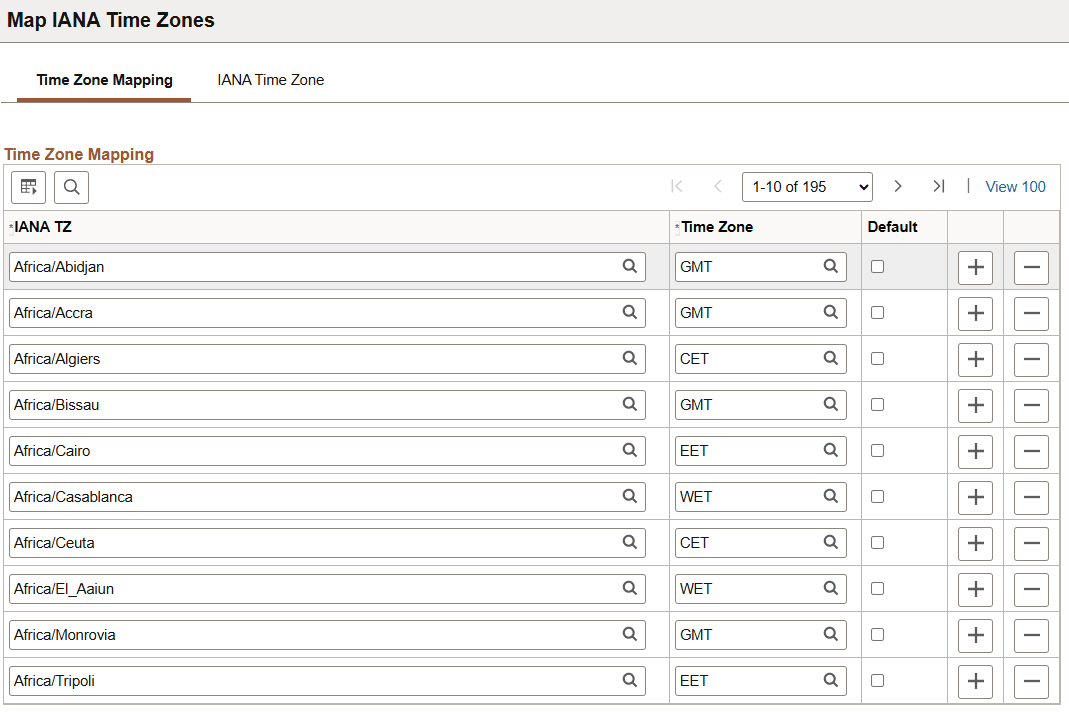
This example illustrates the fields and controls on the Time Zone Mapping Tab in the Time Zone Mapping Page. You can find definitions for the fields and controls later on this page.
| Term | Definition |
|---|---|
|
IANA TZ |
IANA TZ: Specify the IANA time zone in the format from the tzdata file. This value should match the IANA time zone detected by the JVM running on the application server or process scheduler server. Note: The IANA time zone is listed in the server logs as Detected IANA timezone. |
|
Time Zone |
Specify the PeopleSoft time zone ID this IANA time zone maps to. |
|
Default |
Set this to indicate
that this is the default for reverse mapping from PeopleSoft time
zone ID to IANA time zone ID. This reverse mapping is used in XMLP. |
This example illustrates the fields and controls on the IANA Time Zone Tab in the Time Zone Mapping Page. You can find definitions for the fields and controls later on this page.
| Term | Definition |
|---|---|
|
IANA Time Zone |
The time zone listed in tzdata. When the application server or process scheduler starts, it will be running in one of these time zones. These are the lookup values for the Time Zone Mapping page. |
Base Time Zone and Server Time Zone
The base time zone, database server time zone, and application server time zone should all match. This is the reference time zone where all data is stored. The process scheduler time zone can be set to a time zone which is often the same as the base time zone, but can also be set to any local time zone.
When the application server and process scheduler server start up, they map the IANA time zone, as reported by the JVM, to a PeopleSoft time zone ID. This mapping is used by the Query Export to Excel function, and the reverse mapping is used by XMLP.
Tables involved in this mapping are:
-
PSTIMEZONEDEFN: Defines the PeopleSoft time zone IDs.
-
PSDSTTIME: Defines the day and time when DST rules are in effect.
-
PSTIMEZONEIANA: Defines the IANA time zones.
-
PSTIMEZONEMAP: Maps between IANA and PeopleSoft time zone definitions.
The IANA time zone mapping
is used in Query, when exporting queries with date or time related
fields to Excel. To show the IANA time zone in the server logs, set
the LogFence =
5 in psappsrv.cfg or psprcs.cfg. Then, in Query Manager
or Query Viewer, export a query having a date, time, or datetime field
to Excel. The log will show the IANA time zone detected on that server,
and the PeopleSoft time zone it was mapped to.
Adding DST Rules
Example 3-1 Adding DST Rules: PST Example
The delivered DST rules for the PST time zone include effective dates for several time ranges. A more complete list for PST would be the following:
| PTEFFDTTM | OBSERVEDST | DSTOFFSET | DSTSTART | DSTEND |
|---|---|---|---|---|
|
1900-01-01 |
N |
60 |
||
|
1918-01-01 |
Y |
60 |
2LastSunMar |
2LastSunOct |
|
1920-01-01 |
Y |
0 |
2LastSunMar |
2LastSunOct |
|
1942-01-01 |
Y |
60 |
22ndMonFeb |
12LastThuDec |
|
1943-01-01 |
Y |
60 |
0FirstFriJan |
12LastFriDec |
|
1944-01-01 |
Y |
60 |
0FirstSatJan |
12LastSunDec |
|
1945-01-01 |
Y |
60 |
0FirstMonJan |
2LastSunSep |
|
1946-01-01 |
Y |
0 |
2LastSunMar |
2LastSunOct |
|
1948-01-01 |
Y |
60 |
22ndSunMar |
12LastFriDec |
|
1949-01-01 |
Y |
60 |
0FirstSatJan |
2FirstSatJan |
|
1949-01-01 |
Y |
0 |
2FirstSatJan |
2LastSunSep |
|
1950-01-01 |
Y |
60 |
2LastSunApr |
2LastSunSep |
|
1962-01-01 |
Y |
60 |
2LastSunApr |
2LastSunOct |
|
1974-01-01 |
Y |
60 |
2FirstSunJan |
2LastSunOct |
|
1975-01-01 |
Y |
60 |
2LastSunFeb |
2LastSunApr |
|
1976-01-01 |
Y |
60 |
2LastSunApr |
2LastSunOct |
|
1987-01-01 |
Y |
60 |
2FirstSunApr |
2LastSunOct |
|
2007-01-01 |
Y |
60 |
22ndSunMar |
2FirstSunNov |
In the PSTIMEZONEDEFN table, there must be a placeholder row for 1900-01-01, even if DST was not observed then. Additional rows are also needed as the DST rules change over the years, but you only need the DST definitions for the date ranges that you require for business reasons.
To add the DST rules for additional time ranges, check the tzdata file to see which Rules were defined that apply to the given time zone, and derive the PeopleSoft PSDSTTIME entries and PSTIMEZONEDEFN entries you will need. Then use the time zone pages to add the data.
For more information on time zone and the latest tzdata file, see the documentation for IANA.
The tzdata file has a Rule for when Daylight Saving Time comes into effect, and a separate Rule for when Daylight Saving Time goes out of effect. The PeopleSoft PSTIMEZONEDEFN table has one effective dated row showing both the DST start and the DST end. So in general, two lines of tzdata Rules will be represented in one PSTIMEZONEDEFN row.
Example 3-2 Adding DST Rules: IST Example
The IANA naming standard for time zones is based on a location. For example, Asia/Kolkata, and the typical time zone abbreviation used locally is IST for India Standard Time. But IST is also the abbreviation used locally for Israel Standard Time and Irish Standard Time. If your business requires all three of those time zones, only one of them can have a PeopleSoft time zone ID of IST, and the other two will need to have alternative IDs. In this example, IST is only needed for India Standard Time.
India Standard Time does not observe Daylight Saving Time, so it will not need any entries in PSDSTOFFSET, but it will need at least the definition with effective date of 1900-01-01 in PSTIMEZONEDEFN. It will also need entries in PSTIMEZONEMAP for any IANA time zones that the new IST PeopleSoft time zone should map to. In this example, there will be a new row in PSTIMEZONEMAP mapping from Asia/Kolkata to IST, and the column Default will be checked, since the reverse mapping for IST should point to Asia/Kolkata.