Related Language Table Structure
Related language tables store multiple translations of language-sensitive fields from an associated base table. For example, the description (DESCR), short description (DESCRSHORT), and long description (DESCRLONG) fields are commonly language sensitive.
Each table in your database that is not a related language table is, by definition, a base language table. The Message Catalog table, PSMSGCATDEFN, is one example of a base table. Note that it has a DESCRLONG field—which is typically language-sensitive—as well as MESSAGE_TEXT, which is also language-sensitive.
This diagram illustrates related language table structure
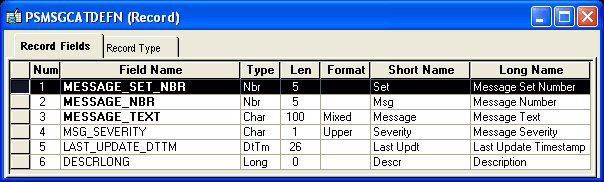
PeopleSoft has therefore created a new record definition, PSMSGCATLANG, to act as the related language table for PSMSGCATDEFN. Related language records are defined in Application Designer just like any other record definitions. However, as they often contain many of the same fields as their base language table, it is often quicker to create the related language table by cloning the base table. To clone a base table, open the base language table and the use the Save As option on the File menu and enter a name for the new record. Once cloned, any fields not required in the related language record can be deleted from the new record.
A related language table must:
-
Share all key record fields with its base table.
-
Have an additional key record field, which must be LANGUAGE_CD.
-
Have language-sensitive fields matching those in the base table. These are typically DESCR, DESCRSHORT or DESCRLONG; or LONGNAME or SHORTNAME.
-
Not contain any fields that are not present on the base table, except the LANGUAGE_CD key field.
-
Not contain any non-key, non-language-sensitive fields from the base table.
The related language table, PSMSGCATLANG, meets all of these requirements. Note that both language-sensitive fields, DESCRLONG and MESSAGE_TEXT, appear in PSMSGCATLANG.
This diagram illustrates related language table structure displaying DESCRLONG and MESSAGE_TEXT
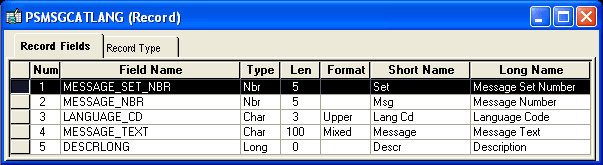
The base table must be explicitly associated with its related language table.
To associate a base table with its related language table:
-
Open the Record Properties dialog box for the base table record.
-
Click the Use tab.
-
Under Record Relationships, in the Related Language Record field enter the name of the related language table.
Note:
There is a one-to-one relationship between the base record and the related language record. Also, the record type of the base record and the related language record should be the same.
-
Click OK.