Related Language Tables Overview
PeopleTools can store multiple translations of application data and PeopleTools objects in a single database. Each PeopleSoft database has a single base language. The base language of a new PeopleSoft database upon installation is always English, but can be changed by an administrator. The base language should be the language most commonly used by application users, and is the language in which data is stored in the core PeopleSoft tables known as base language tables.
All PeopleTools objects, such as pages, fields and queries, can be maintained in multiple languages. Descriptions of application data elements, such as departments, locations and job codes, can also be maintained in multiple languages.
The key to maintaining this data in multiple languages is the use of special tables known as related language tables. A related language table stores descriptions and other language-sensitive elements in all languages other than the base language of the database. In this way, while any table in the database can store data in the base language of that database, only tables that have related language tables can maintain the same data in multiple languages simultaneously. For example, it is unlikely that you will want to maintain the descriptions of your general ledger journal lines in multiple languages − the sheer volume of the journal lines in most systems would preclude any effort to maintain translations of their descriptions. The cost of hiring a translator to translate each journal line would be prohibitive, and in most cases only the person entering the journal line, and possibly their supervisor, would be likely to want to view it again. However for frequently used values, such as a chart of accounts, many users across your entire organization would often need to refer to this data, and so you would most likely want to maintain the descriptions of each ChartField entry in each language spoken by your users.
In this case, you would not need a related language table for your Journal Lines table, as you would be maintaining Journal Line descriptions in a single language only, and this would be in the base table, but you would need a related language table for each of your ChartField tables.
When the system displays a language-sensitive field value, it retrieves the text from either the base table or the related language table, depending on the following:
-
The current language preference.
-
Whether any translated rows for the field are found in the related language table.
The language preference applies to both the session language and the data language and can be different for each.
Note:
In the case of Application Designer, the language preference is determined by the PeopleSoft Configuration Manager language setting.
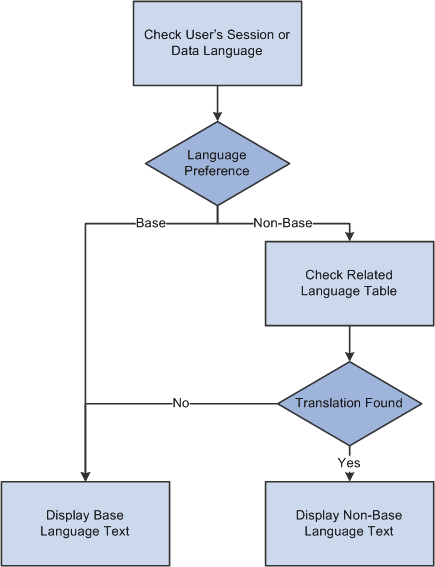
If the current language preference is the system's base language, the text is retrieved from the base table. If the language preference is a non-base language, then the system looks for a translation of the text in the related language table. If it finds a translation, it displays the translated text; if no translation exists, the system uses the text in the base table. This enables developers to selectively translate portions of the system, while keeping the system fully functional at all times, even if not all rows have been translated.
This diagram illustrates the flow of execution of translated language text
Synchronization of related language tables with their base tables is automatically maintained by PeopleTools. When you translate a language-sensitive field, the system adds a new row to the related language table. When you delete a row from a base table, any child rows in the related language table are deleted. The primary responsibility of the application developer in the language architecture is to define and maintain the related language tables.
Note:
PeopleTools automatically handles the storage and display of data in related language tables and their synchronization with corresponding entries in the base language tables based on each user’s language preference. However, PeopleTools cannot automatically translate data! The PeopleSoft system provides translations of PeopleSoft Pure Internet Architecture components and user interfaces for most application products into several languages. Also, translations of several key application data tables, such as country and currency codes, are provided by the PeopleSoft system. However, you will need to plan a way to translate application data entered by your users that needs to be maintained in multiple languages. Some users who are familiar with several languages may want to translate the data elements they enter themselves using the Multilingual Data Entry Support feature. In other cases, you may want to bring in translators periodically to translate key elements into each language used in your organization. PeopleTools provides an architecture to store these translations, but does not perform “machine translation” or provide other automated linguistic translation technologies.