Building Introspection into Target Connectors
PeopleSoft Integration Broker can introspect (query) the capabilities of target connectors that are installed on a local or remote integration gateway by using introspection. Load all target connectors that are delivered with PeopleSoft Integration Broker by clicking the Load button on the Connectors page in the Gateways component.
You can build introspection into custom-built connectors. When you do so, you can load the connector and its properties with the click of a button.
For the introspection process to gather information about a custom target connector, you must implement the IntrospectConnector method.
The following example shows the connector properties that are available for use with the SMTP target connector:
public ConnectorDataCollection introspectConnector() {
   //Creates the ConnectorDataCollection that will be returned
   //by this method. This object will contain all the
   //necessary information about this Connector's properties.

      ConnectorDataCollection conCollection = new ConnectorDataCollection();

      //Create ConnectorData Object and stipulating the name of
      //the connector as seen from the Gateway Component.

      ConnectorData conData = new ConnectorData("SMTPTARGET");

      conData.addConnectorField("DestEmailAddress", true, "", "");
      conData.addConnectorField("SourceEmailAddress", true, "", "");
      conData.addConnectorField("CC", false, "", "");
      conData.addConnectorField("BCC", false, "", "");
      conData.addConnectorField("HEADER", Content-type”, false,
         "", "text/plain|text/html");
      conData.addConnectorField("HEADER","sendUncompressed",true,
         "Y","Y|N");

      //Add the ConnectorData to your ConnectorDataCollection
      //Object. Typically, you would only
      //add one ConnectorData into your ConnectorDataCollection.
      conCollection.addConnectorData(conData);

   return conCollection;
}
Use the addConnectorField method to add connector fields:
addConnectorField ([PropertyID] PropertyName,
Required, DefaultValue, PossibleValues)
Use the following parameters for this method:
| Parameter | Description |
|---|---|
|
Property ID |
Identifies different property types, such as HEADER for HTTP or SMTP. PeopleSoft software also uses the HEADER property ID to allow a message to be sent in either compressed or clear format through the sendUncompressed property. If this parameter is not supplied, the property ID is the connector name. |
|
Property Name |
Identifies the name of the connector property. |
|
Required |
Determines whether the information is required for the target connector to deliver its message. Values are:
|
|
Default Value |
Identifies the default value for the property. Typically, you set the Required parameter to True when you specify a default value so that this information carries to the node configuration in the integration engine. |
|
Possible Values |
Identifies a list of the possible values that the property can take, separated by the | character. |
The following definition shows how these properties function:
conData.addConnectorField("HEADER","sendUncompressed",true,"Y, "Y|N");In this case, the property name is sendUncompressed and its property ID is HEADER. The sendUncompressed property is required (the third parameter is set to true), so that whenever you create a node in the node definition component and specify SMTPTARGET as the target connector, this property appears on the page automatically. Further, because the default value is set to Y, this is the default value. Possible values have been identified as Y or N. If you click the list box (search box) for this property on the Connectors tab in the Node Definition component, you can select from those two values.
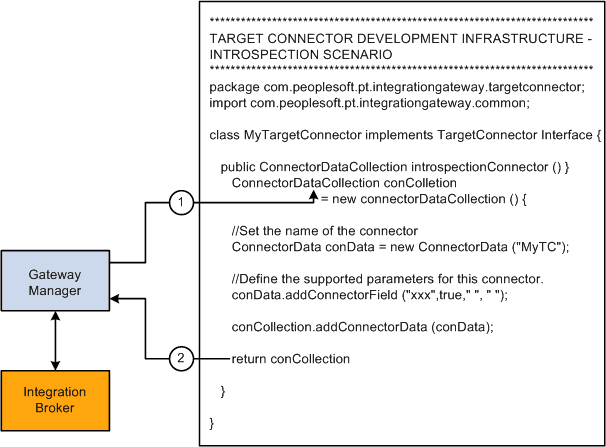
The following diagram shows how connector code accomplishes introspection.
This diagram shows how connector code accomplishes introspection.