Using the Target Connector Interface
As with PeopleSoft-provided target connectors, the integration gateway dynamically invokes custom target connectors through the gateway manager. Target connectors must adhere to a standard structure as defined in the target connector interface.
public interface TargetConnector {
   IBResponse send(IBRequest request) throws
                     GeneralFrameworkException,
                     DuplicateMessageException,
                     InvalidMessageException,
                     ExternalSystemContactException,
                     ExternalApplicationException,
                     MessageMarshallingException,
                     MessageUnmarshallingException;

   IBResponse ping(IBRequest request) throws
                     GeneralFrameworkException,
                     DuplicateMessageException,
                     InvalidMessageException,
                     ExternalSystemContactException,
                     ExternalApplicationException,
                     MessageMarshallingException,
                     MessageUnmarshallingException;

ConnectorDataCollection introspectConnector();
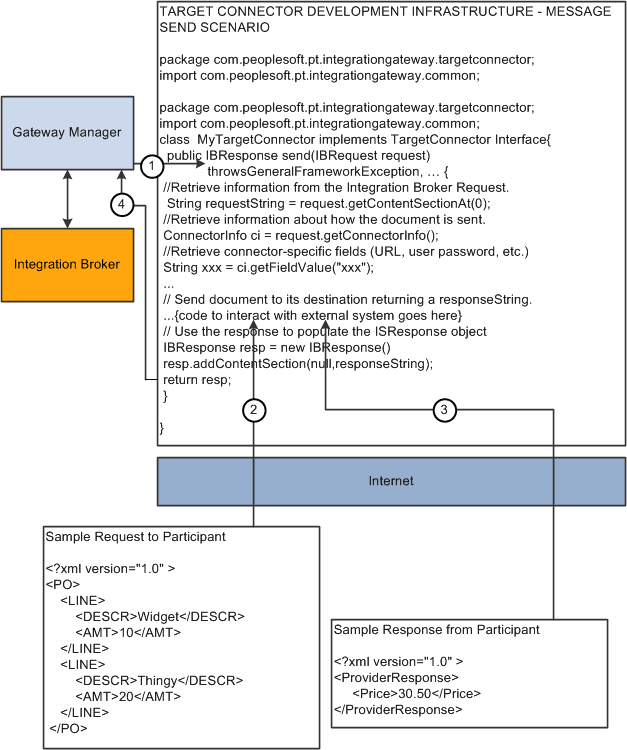
Use the Send method to send a request to an external system and to retrieve its response. The gateway manager passes the request to this method and expects a response to be returned.
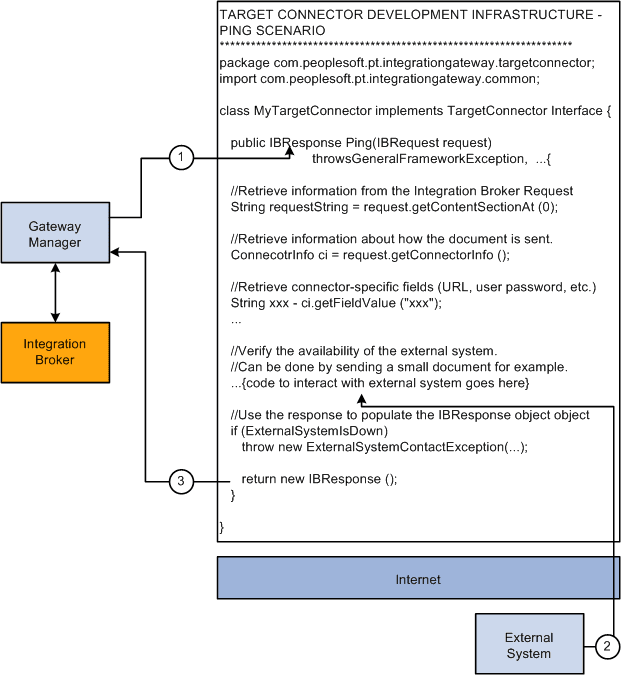
The Ping method enables PeopleSoft Integration Broker to verify the availability of a site. The Integration Broker Monitor can also invoke the Ping method explicitly.
The following diagram shows how the Send method connector code generates and sends message requests to integration participants and returns responses:
This diagram shows how the Send method connector code generates and sends message requests to integration participants and returns responses.
The following diagram shows how the Ping method connector code pings external systems.
This diagram shows how the Ping method connector code pings external systems.
ConnectorDataCollection invokes introspection and the introspectConnector method is used by the application server to discover the connector properties that are used with the given target connector.