Confirming Integration Gateway Keystore Values are Set
You can confirm that the path to the gateway keystore and the keystore password are set on the Node Network page. The page features a read-only Secure Keystore Value Defined field that indicates if these values are set in the integration gateway properties file.
To access the Node Network page select
This example illustrates the Node Network page.
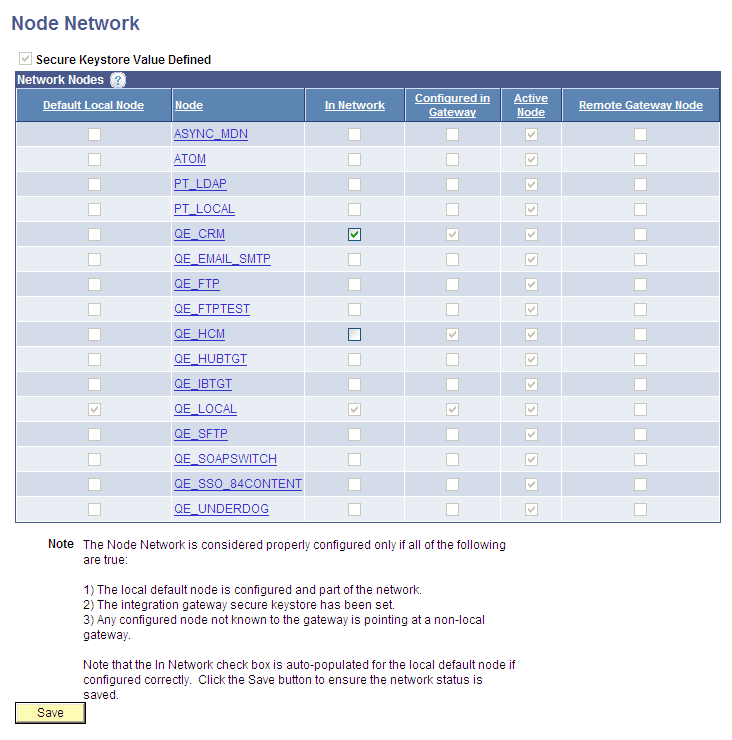
The top left corner of the Node Network page features a read-only Secure Keystore Value Defined field. When the box is selected, the path to the gateway keystore and the keystore password are defined in the integration gateway properties file. The previous example shows that the Secure Keystore Value Defined field is selected and indicates the values are defined in the integration gateway properties file.
Important:
The importance of defining the keystore path and password in the integration gateway properties file cannot be stressed enough. If these values are not set, integrations will fail.
If on your system the Secure Keystore Value Defined field is not selected as shown in the example, return to first activity in this activity guide and define these values.