Enabling Failover on Domains
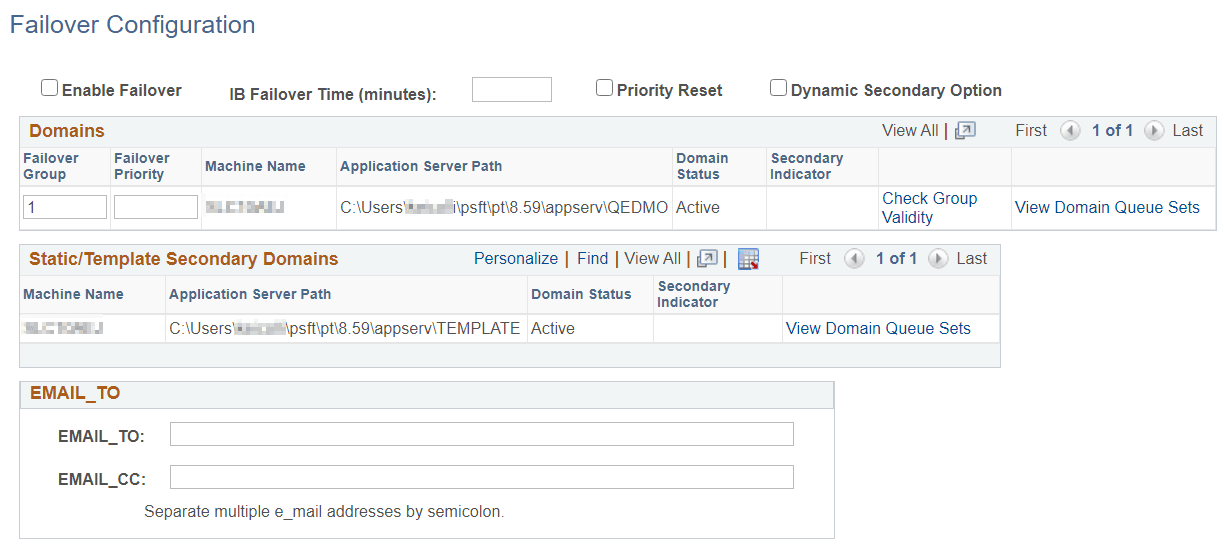
Use the Failover Configuration page (IB_AMM_FAILOVER) to enable failover on domains.
This example illustrates the Failover Configuration page.
To set up domain failover:
-
Access the Failover Configure page ( and click the Set Up Failover link).
-
Select the Enable Failover box.
-
In the IB Failover Time (minutes) field, specify the number of minutes that can pass without the domain registering itself before the failover should commence
-
(Optional.) To implement dynamic secondaries, select the Dynamic Secondary Option.
-
(Optional.) In the Failover Group field, enter a numeric value to specify a group to which a domain belongs.
A value of 1 indicates that the domain is the first backup domain; a value of 2 indicates that the domain is the second back-up domain if the first backup domain fails; and so on.
-
In the Failover Priority field, enter a numeric value to specify the priority for a back up domain in the failover configuration.
A value of 1 indicates that the domain is the first backup domain; a value of 2 indicates that the domain is the second back up domain; and so on.
-
(Optional.) In the Email_TO field, specify the email addresses of people to whom the system sends a notification about the domain failure if it occurs.
Separate multiple email addresses with a semicolon.
-
(Optional.) In the Email_CC field, specify the email addresses of people who receive copies of the domain failure notification.
Separate multiple email addresses with a semicolon.
-
Click the Save button.