Overriding Node-Level WS-Security Settings on Routing Definitions
This section discusses how to:
-
Override WS-Security settings on routing definitions (General).
-
Override WS-Security settings on routing definitions (Synchronous Responses).
-
Override WS-Security settings on routing definitions (Asynchronous Requests/Responses).
Understanding Overriding Node-Level WS-Security Settings on Routing Definitions
You can override node-level WS-Security settings on individual routing definitions for outbound request and response messages. The security settings that you can override are the same as those that appear on the Nodes-WS Security page.
When overriding WS-Security settings for synchronous request messages and asynchronous request/response messages, there are PeopleCode considerations of which you should be aware. In addition, the outbound security overrides on the routing definition for these transaction types work in concert with inbound security validation set on the service operation. These considerations and options are discussed in this section.
Overriding WS-Security Settings on Routing Definitions (General)
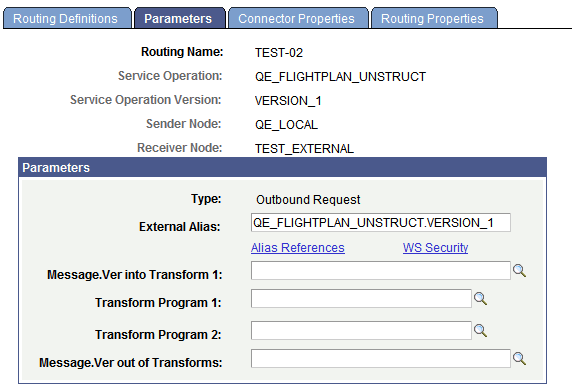
When you are working with an outbound routing definition to a external node, the Routing Definitions – Parameters page (IB_ROUTINGDEFNDOC) features a WS-Security link that provides access to options to override node-level WS-Security settings.
To access the Routing Definitions – Parameters page select and click the Parameters tab.
This example illustrates the Routing Definitions – Parameters page. Use the WS Security link under the External Alias field to override node-level WS-Security settings.
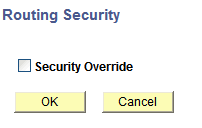
When you click the WS Security link the Routing Security page (IB_ROUTINGDEFN_SEC) appears.
This example illustrates the Routing Security page. The Routing Security does not display any override options until you check the Security Override box.
When you check the Security Override box on the Routing Security page, the WS-Security options that you can override appear on the page.
Check the Security Override button to view override options. This example illustrates override options when Username Token is the authentication type.
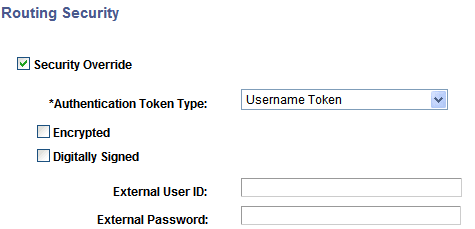
The WS-Security options that appear and that you can use to set and override in a routing definition, depend on the authentication type and encryption option, if any, set.
To override WS-Security options on a routing definition:
-
Select , and select or add a routing definition.
-
Click the Parameters tab.
A WS Security link appears for the outbound request or response message, depending on whether the external node is the sending or receiving node.
-
Click the WS Security link.
The Routing Security page appears.
-
Select the Security Override box.
The Authentication Token Type drop-down list box appears.
-
From the Authentication Token Type drop-down list box, choose an authentication token type with which to work. The options are:
-
None. (Default.)
-
SAML Token.
-
Username Token.
-
If you choose SAML token or Username token, additional security options appear with which to work. SAML token and Username token security options for outbound messages are discussed elsewhere in this topic.
See Implementing WS-Security for Outbound Integrations (Username and SAML Tokens).
Overriding WS-Security Options on Routing Definitions (Synchronous Responses)
To override the security for a synchronous response, on the Routing Definitions – Parameters page, select the WS Security link on the Outbound Response Parameter:
If the Encrypted check box is selected then the response message sent from the consumer must be digitally signed if the routing is an any-to-local type routing.
In addition, you can reject a request message that is not digitally signed. To do so, on the Service Operations-General page, from the Security Verification \ drop-down list select Digitally Signed.
Overriding WS-Security Options on Routing Definitions (Asynchronous Request/ Response)
You can use the Routing Security page to encrypt and/or digitally sign outbound responses in asynchronous request/response transactions.
If you select the Encrypted box for the outbound response message, then the message sent from the consumer must be digitally signed if the routing is an any-to-local type routing.
You can then select the Digitally Signed option for Security Verification on the service operation to reject a non-signed request message.
To successfully use WS-Security on a response, within the PeopleCode the RequestAliasName must also be populated on the response Message object from the request Message object. Here is an example in PeopleCode:
&MSG_resp = CreateMessage(Operation.FLIGHTPLAN_DOC_ARR, %IntBroker_Response);
&MSG_resp.IBInfo.WSA_MessageID = &MSG.IBInfo.WSA_MessageID;
&MSG_resp.IBInfo.WSA_ReplyTo = &MSG.IBInfo.WSA_ReplyTo;
&MSG_resp.IBInfo.WS_RequestAliasName = &MSG.IBInfo.WS_RequestAliasName;
The system validates proper encryption based on the request verification selected on the service operation. Select the desired security validation. If the security on the actual request message does not match the value specified in the Security Verification field, an error is sent back to the client.