Selecting Nodes for Integration Introspection and Deployment
Use the Target page (IB_INTNETTARGET) to select nodes for integration introspect and deploy integrations. You can select the default local node, for local-to-local integrations, or select one or more remote nodes.
To access the Target page, from the Search for Items – Introspection/Deployment page, click the Continue button.
This example illustrates the Target page.
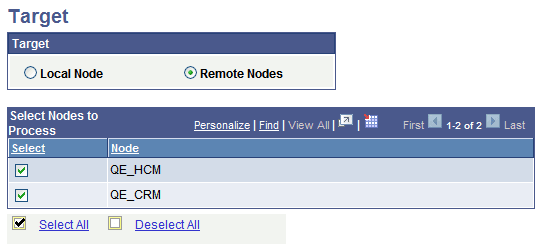
To select nodes for introspection and deployment:
-
Access the Target page. (From the Search for Items – Introspection/Deployment page, click the Continue button.)
-
Perform one of the following actions:
-
Select the Local Node radio button for local-to-local integrations.
-
Select the Remote Nodes radio button to introspect and deploy integrations to remote PeopleSoft nodes.
-
Selecting the Local Default Node for Integration Introspection and Deployment
To select the local default node for integration introspection and deployment:
-
Access the Target page. (From the Search for Items – Introspection/Deployment page, click the Continue button.)
-
Select the Local Node radio button.
-
Click the Continue button.
Selecting Remote PeopleSoft Nodes for Integration Introspection and Deployment
To select remote PeopleSoft nodes for integration introspection and deployment:
-
Access the Target page. (From the Search for Items – Introspection/Deployment page, click the Continue button.)
-
Select the Remote Nodes radio button.
-
Use one of the following methods to select nodes for integration introspection and deployment:
By default, all remote nodes in the integration network are selected for introspection and deployment.
-
Check the Select box next to individual integrations to select them or deselect them.
-
Click the Select All link to select all the integrations in the results grid.
-
Click Deselect All link to deselect all the integrations in the results grid.
-
-
Click the Continue button to preview the integrations to be introspected and deployed.