Selecting Nodes to Monitor in the Integration Network Monitor
Each page of the Network Monitor features a Network Node List. The Network Node List contains a list of active integration network nodes for which you can monitor integration activity. The Network Node List appears on all of the Network Monitor pages.
This example illustrates the Network Monitor – Network Node List.
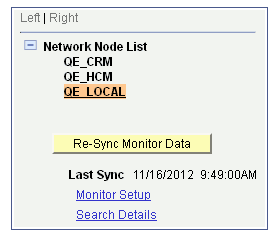
The example shows that there are three active network nodes for which you can monitor data, QE_CRM,QE_HCM and QE_LOCAL.. The QE_LOCAL node is highlighted and denotes that it is the currently selected node for monitoring network activity.
To change or select a node, click the node name in the tree.
When you select a node in the Network Node List, the system automatically resynchronizes and fetches the most current transaction data for the selected node.