Understanding Inbound User Authentication
The inbound user authentication process determines the user ID that has been sent with an inbound service operation and determines if the sender is able to invoke the service operation.
The inbound user authentication process depends on whether the sender is a PeopleSoft node, the sender is an external node, or if the sender is not associated with any node. This section discuss user authentication processing for each of these situations.
Inbound User Authentication: PeopleSoft Node is the Sending Node
The following diagram illustrates the inbound user authentication process when a PeopleSoft node type is the sending node:
The following diagram illustrates the inbound user authentication process when a PeopleSoft node type is the sending node.
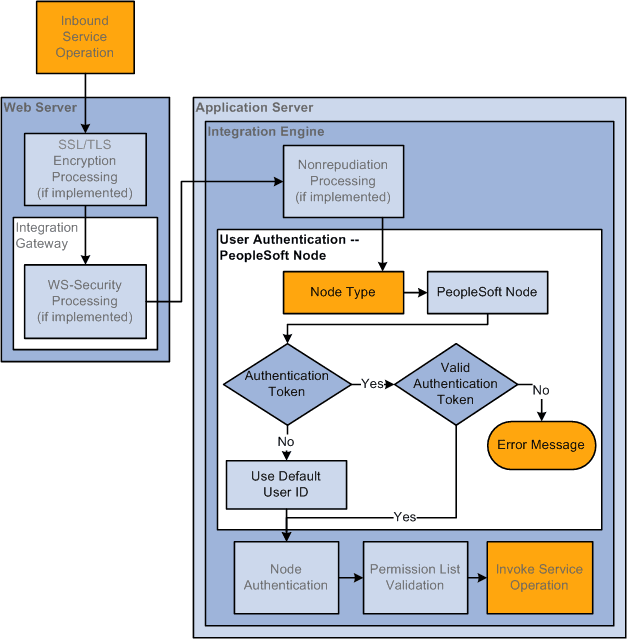
If the sending node is a PeopleSoft node, the system determines if an authentication token has been sent with the transaction. The system uses the authentication token to verify the sending node.
Note that the sending node does not need to be defined as trusted node on the receiving system for the PeopleSoft authentication token to be validated.
See Understanding User Authentication.
If authentication passes, the service operation has passed user authentication. If the authentication cannot be validated an error message is generated.
If no authentication token is included with the service operation, the system uses the default user ID on the external PeopleSoft node as the user ID.
Inbound User Authentication: External Node is the Sending Node
The following diagram illustrates user authentication processing when the sending node is an external node:
The following diagram illustrates user authentication processing when the sending node is an external node.
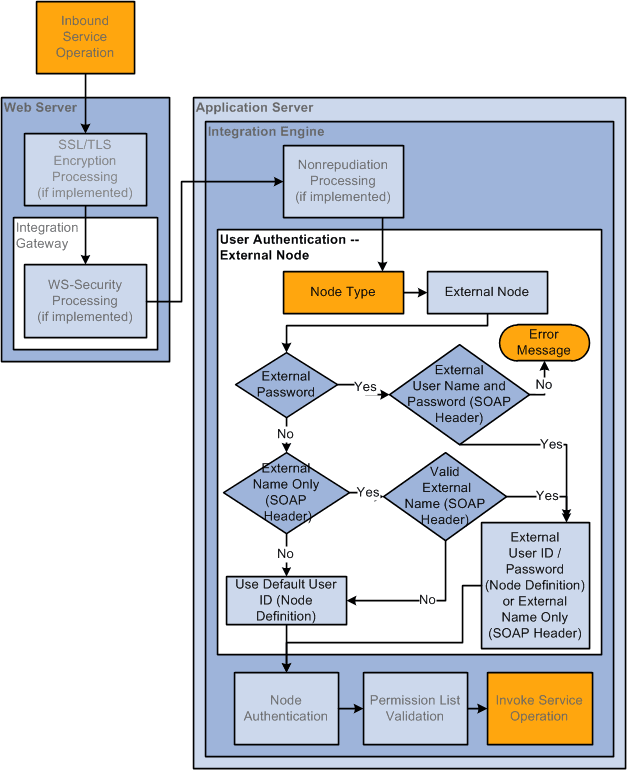
If the sending node is an external node type, the system first looks for a user ID and password set in the SOAP message header included with the inbound service operation. If both a user ID and password are not found, the system looks in the SOAP message header for a user ID only. If no user ID/password or no user ID are found in the SOAP message header, the system uses the user ID set in the Default User ID field in the remote node definition.
Inbound User Authentication: Third–Party System Sending the Service Operation
The following diagram illustrates user authentication processing when a third-party system sends a service operation:
The following diagram illustrates user authentication processing when a third-party system sends a service operation.
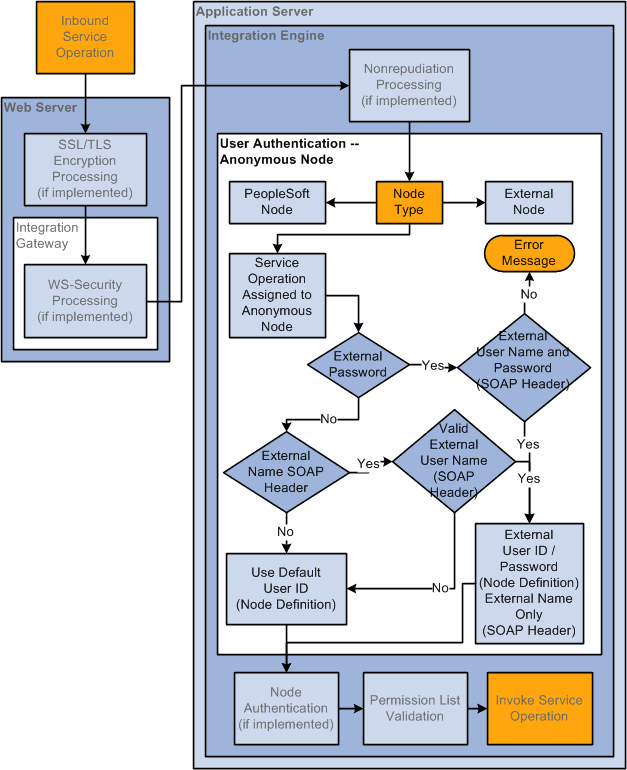
Because third-party systems do not understand the concept of a node as defined and used within the context of PeopleSoft systems, PeopleSoft assigns transactions that have no node specified to a PeopleSoft-delivered Anonymous node.
If the PeopleSoft system first checks the SOAP message header for an external name and password set programmatically.
If none is found or if the system cannot validate the user ID or password that was set programmatically, it uses the Default User ID set on the Node Definitions page on the remote Anonymous node definition.